Catch-All Domain Detection: Advanced SMTP Probing Techniques
Your email list looks clean. Your bounce rate says otherwise. If you've ever watched a carefully segmented campaign collapse under the weight of unexpected hard bounces, there's a good chance catch-all domains were the silent culprit — and your verification stack never saw them coming.
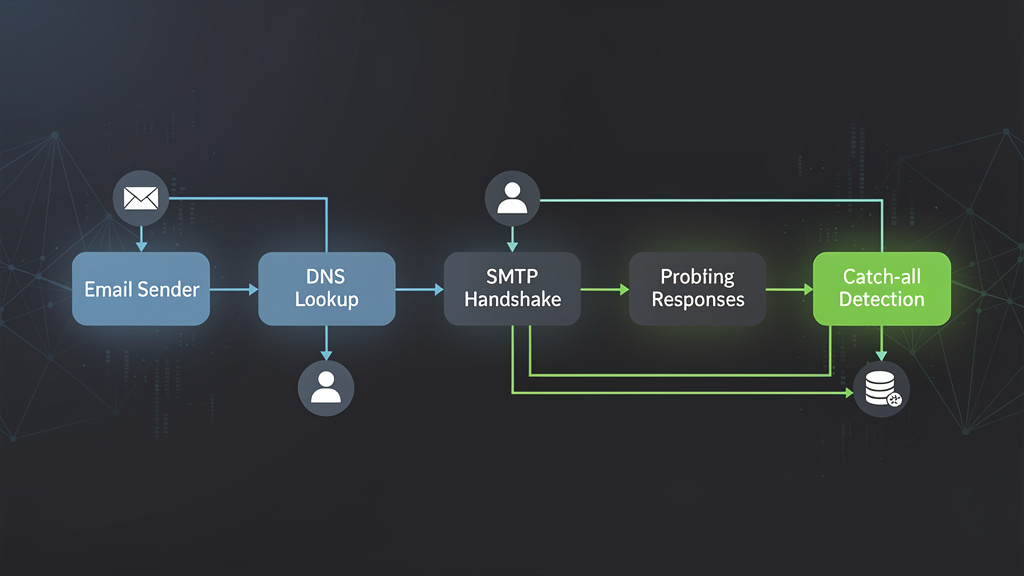
What Catch-All Domains Are Doing to Your Deliverability (And Why Most Validators Miss Them)
Catch-all domains are configured to accept every email sent to them, regardless of whether the specific mailbox exists. The mail server at the receiving end never rejects an address at the SMTP level — it says "yes, I'll take that" for [email protected] just as readily as it does for [email protected]. This behavior is intentional on the domain owner's side, often implemented to prevent missing emails sent to mistyped or legacy addresses. For your email verification pipeline, however, it represents one of the most dangerous blind spots in the industry.
According to data published by Validity (formerly Return Path), catch-all domains account for between 8% and 15% of all business email domains encountered in typical B2B marketing lists. When you layer in the reality that most standard SMTP verification tools will mark these addresses as "valid" by default — because the server technically accepts them — you're looking at a significant portion of your list that is verified on paper but undeliverable in practice.
The consequences are not abstract. Litmus's 2023 State of Email report found that sender reputation degradation begins measurably when bounce rates exceed 2%. A single campaign sent to an unscreened list containing 10% catch-all addresses, where even half of those addresses are non-existent mailboxes, can push a sender past that threshold in a single send. Once your IP or domain reputation drops, the damage compounds: inbox placement rates fall, engagement metrics deteriorate, and ISPs begin throttling or blocking your traffic entirely.
Understanding catch-all detection at a technical level — not just conceptually, but at the protocol and implementation layer — is what separates email infrastructure engineers who maintain 99%+ deliverability from those who are perpetually firefighting bounce crises.
The SMTP Handshake: What Actually Happens During Email Verification
To understand why catch-all domains are so difficult to detect, you need to understand what happens during a standard SMTP verification probe. The process is defined in RFC 5321 (the Simple Mail Transfer Protocol specification), which governs how SMTP clients and servers communicate during the mail exchange process.
The Standard SMTP Verification Flow
A typical SMTP verification probe follows this sequence:
- DNS MX record lookup — The verifier queries DNS for the MX records of the domain to identify the receiving mail server.
- TCP connection — A TCP connection is established to the mail server on port 25 (or 587/465 in some configurations).
- EHLO/HELO greeting — The verifier introduces itself with an EHLO or HELO command.
- MAIL FROM — The verifier specifies a sender address (often a null sender
<>or a probe address). - RCPT TO — The verifier specifies the recipient address being verified.
- Server response — The server responds with an acceptance or rejection code.
- QUIT — The connection is terminated without actually sending a message.
The critical moment is step 6. For a normal domain with properly configured mailboxes, the server will respond with a 250 response code for valid addresses and a 550 (or similar 5xx code) for invalid ones. RFC 5321 Section 4.2 defines these response codes explicitly:
- 250 — Requested mail action okay, completed (address accepted)
- 550 — Requested action not taken: mailbox unavailable (address rejected)
- 551 — User not local; please try forwarding
- 552 — Requested mail action aborted: exceeded storage allocation
- 421 — Service not available, closing transmission channel (temporary issue)
- 450 — Requested mail action not taken: mailbox unavailable (temporary, retry later)
Where Catch-All Domains Break This Model
On a catch-all domain, the server responds with 250 to every RCPT TO command, regardless of whether the mailbox exists. The server is configured — deliberately — to accept all incoming mail at the SMTP layer, typically routing it to a single catch-all inbox or discarding it silently. From the perspective of your SMTP probe, the address [email protected] looks identical to [email protected]. Both get a 250. Both appear valid.
This is where naive verification tools fail completely. They interpret a 250 response as confirmation of deliverability, when in reality it's a policy decision by the domain administrator that tells you nothing about whether the specific mailbox exists.
Advanced SMTP Probing Techniques for Catch-All Detection
Detecting catch-all behavior requires going beyond the single RCPT TO probe. The core principle is comparative probing: you need to send multiple SMTP commands and analyze the pattern of responses, not just a single response code.
Technique 1: The Canary Address Probe
The most reliable catch-all detection method involves probing the domain with a deliberately fabricated, cryptographically random address before probing the target address. The logic is straightforward:
- Generate a random string that is statistically impossible to exist as a real mailbox (e.g.,
[email protected]). - Send an RCPT TO probe with this canary address.
- If the server returns 250 for the canary address, the domain is a catch-all.
- If the server returns a 5xx rejection for the canary address, proceed to probe the target address normally.
This technique works because no legitimate mail server would have a mailbox matching a 16-character random alphanumeric string. A 250 response to such a probe is definitive evidence of catch-all configuration.
Here's a production-ready implementation of this technique in Python:
import smtplib
import dns.resolver
import random
import string
import socket
import logging
from dataclasses import dataclass
from typing import Optional, Tuple
from enum import Enum

logging.basicConfig(level=logging.INFO)
logger = logging.getLogger(__name__)


class VerificationResult(Enum):
    VALID = "valid"
    INVALID = "invalid"
    CATCH_ALL = "catch_all"
    UNKNOWN = "unknown"
    TIMEOUT = "timeout"
    ERROR = "error"


@dataclass
class SMTPProbeResult:
    result: VerificationResult
    smtp_code: Optional[int]
    smtp_message: Optional[str]
    is_catch_all_domain: bool
    mx_host: Optional[str]
    error: Optional[str] = None


def generate_canary_address(domain: str, length: int = 16) -> str:
    """Generate a statistically impossible mailbox address for catch-all probing."""
    chars = string.ascii_lowercase + string.digits
    random_local = ''.join(random.choices(chars, k=length))
    return f"{random_local}@{domain}"


def get_mx_record(domain: str, timeout: int = 10) -> Optional[str]:
    """Resolve the highest-priority MX record for a domain."""
    try:
        resolver = dns.resolver.Resolver()
        resolver.lifetime = timeout
        mx_records = resolver.resolve(domain, 'MX')
        # Sort by priority (lowest number = highest priority)
        sorted_mx = sorted(mx_records, key=lambda r: r.preference)
        return str(sorted_mx[0].exchange).rstrip('.')
    except (dns.resolver.NXDOMAIN, dns.resolver.NoAnswer, dns.exception.Timeout) as e:
        logger.error(f"MX lookup failed for {domain}: {e}")
        return None


def smtp_probe(
    mx_host: str,
    sender: str,
    recipient: str,
    helo_domain: str = "mailvalid.io",
    timeout: int = 15,
    port: int = 25
) -> Tuple[Optional[int], Optional[str]]:
    """
    Perform a single SMTP RCPT TO probe without sending mail.
    Returns (smtp_code, smtp_message) tuple.
    """
    smtp_code = None
    smtp_message = None

    try:
        with smtplib.SMTP(timeout=timeout) as smtp:
            smtp.connect(mx_host, port)
            smtp.ehlo(helo_domain)
            smtp.mail(sender)
            code, message = smtp.rcpt(recipient)
            smtp_code = code
            smtp_message = message.decode('utf-8', errors='replace') if isinstance(message, bytes) else message
            smtp.quit()
    except smtplib.SMTPConnectError as e:
        logger.warning(f"SMTP connect error to {mx_host}: {e}")
        raise
    except smtplib.SMTPServerDisconnected as e:
        logger.warning(f"SMTP server disconnected unexpectedly: {e}")
        raise
    except socket.timeout:
        logger.warning(f"SMTP probe timed out connecting to {mx_host}")
        raise
    except Exception as e:
        logger.error(f"Unexpected SMTP error: {e}")
        raise

    return smtp_code, smtp_message


def verify_with_catch_all_detection(
    email: str,
    probe_sender: str = "[email protected]",
    timeout: int = 15
) -> SMTPProbeResult:
    """
    Full email verification with catch-all domain detection using canary probing.
    """
    if '@' not in email:
        return SMTPProbeResult(
            result=VerificationResult.ERROR,
            smtp_code=None,
            smtp_message=None,
            is_catch_all_domain=False,
            mx_host=None,
            error="Invalid email format"
        )

    local_part, domain = email.rsplit('@', 1)

    # Step 1: Resolve MX record
    mx_host = get_mx_record(domain)
    if not mx_host:
        return SMTPProbeResult(
            result=VerificationResult.INVALID,
            smtp_code=None,
            smtp_message=None,
            is_catch_all_domain=False,
            mx_host=None,
            error="No MX record found"
        )

    # Step 2: Canary probe to detect catch-all behavior
    canary_address = generate_canary_address(domain)
    is_catch_all = False

    try:
        canary_code, canary_message = smtp_probe(
            mx_host=mx_host,
            sender=probe_sender,
            recipient=canary_address,
            timeout=timeout
        )

        if canary_code == 250:
            is_catch_all = True
            logger.info(f"Catch-all detected for domain {domain} (canary returned 250)")
        elif canary_code and canary_code >= 500:
            logger.info(f"Domain {domain} is NOT catch-all (canary rejected with {canary_code})")

    except socket.timeout:
        return SMTPProbeResult(
            result=VerificationResult.TIMEOUT,
            smtp_code=None,
            smtp_message=None,
            is_catch_all_domain=False,
            mx_host=mx_host,
            error="Timeout during canary probe"
        )
    except Exception as e:
        return SMTPProbeResult(
            result=VerificationResult.UNKNOWN,
            smtp_code=None,
            smtp_message=None,
            is_catch_all_domain=False,
            mx_host=mx_host,
            error=str(e)
        )

    # Step 3: Probe the actual target address
    try:
        target_code, target_message = smtp_probe(
            mx_host=mx_host,
            sender=probe_sender,
            recipient=email,
            timeout=timeout
        )

        if is_catch_all:
            result = VerificationResult.CATCH_ALL
        elif target_code == 250:
            result = VerificationResult.VALID
        elif target_code and target_code >= 500:
            result = VerificationResult.INVALID
        else:
            result = VerificationResult.UNKNOWN

        return SMTPProbeResult(
            result=result,
            smtp_code=target_code,
            smtp_message=target_message,
            is_catch_all_domain=is_catch_all,
            mx_host=mx_host
        )

    except socket.timeout:
        return SMTPProbeResult(
            result=VerificationResult.TIMEOUT,
            smtp_code=None,
            smtp_message=None,
            is_catch_all_domain=is_catch_all,
            mx_host=mx_host,
            error="Timeout during target probe"
        )
    except Exception as e:
        return SMTPProbeResult(
            result=VerificationResult.ERROR,
            smtp_code=None,
            smtp_message=None,
            is_catch_all_domain=is_catch_all,
            mx_host=mx_host,
            error=str(e)
        )
Technique 2: Multi-Probe Response Pattern Analysis
A single canary probe, while effective, can produce false positives in edge cases — for example, when a mail server is temporarily misconfigured or when rate limiting causes inconsistent responses. A more robust approach uses multiple canary probes and analyzes the response pattern.
The algorithm works as follows:
- Send 3-5 canary probes with different random addresses.
- If all probes return 250, classify as catch-all with high confidence.
- If responses are mixed (some 250, some 550), flag as potentially misconfigured or rate-limited — treat as unknown.
- If all probes return 5xx, classify as non-catch-all and proceed with normal verification.
This pattern analysis approach is particularly important because some mail servers implement greylisting (RFC 6647) or temporary deferrals that can produce inconsistent results during rapid sequential probing. The 421 and 450 response codes are temporary failure indicators that should trigger retry logic rather than immediate classification.
Technique 3: Timing and Response Behavior Analysis
Advanced catch-all detection can also leverage response timing analysis. Legitimate mail servers that are actually checking mailbox existence typically have slightly higher response times for the RCPT TO command because they need to query their user database. Catch-all servers, which bypass this lookup entirely, often respond marginally faster.
While timing analysis alone is not sufficient for reliable classification, it can serve as a confidence-boosting signal when combined with response code analysis. This is particularly useful for mail servers that implement "accept-then-filter" policies, where they accept all mail at the SMTP layer and perform filtering internally.
DNS Infrastructure Analysis as a Catch-All Signal
SMTP probing is the most direct method for catch-all detection, but DNS record analysis can provide valuable supporting signals before you ever open an SMTP connection. This multi-layer approach reduces the number of SMTP connections needed and improves overall throughput.
Reading SPF Records for Infrastructure Clues
RFC 7208 defines the Sender Policy Framework, and SPF record structure can reveal information about a domain's mail infrastructure. A domain with an extremely permissive SPF record — particularly one using +all (pass all) or ?all (neutral for all) — is more likely to be running a catch-all configuration, because the same administrative philosophy that leads to permissive SPF often leads to permissive SMTP acceptance policies.
A typical SPF record looks like this:
v=spf1 include:_spf.google.com include:mailgun.org ~all
The ~all (softfail) mechanism is the most common in legitimate business configurations. When you see +all, treat it as a strong signal that the domain administrator has adopted a permissive stance toward email — a pattern that correlates with catch-all configuration.
DMARC Policy Analysis
RFC 7489 defines DMARC (Domain-based Message Authentication, Reporting, and Conformance). A domain's DMARC policy provides indirect signals about how seriously the organization manages its email infrastructure:
v=DMARC1; p=reject; rua=mailto:[email protected]; ruf=mailto:[email protected]; pct=100
Domains with p=none DMARC policies (or no DMARC record at all) are statistically more likely to have catch-all configurations, because both behaviors reflect a lower level of email infrastructure maturity. This is a probabilistic signal, not a deterministic one, but it's useful for prioritizing which domains to probe more aggressively.
MX Record Patterns
The MX records themselves can provide catch-all signals. Domains that route through well-known corporate mail platforms (Google Workspace, Microsoft 365) with standard MX configurations are less likely to implement catch-all behavior than domains running self-hosted mail servers. However, this is a weak signal — many organizations on Google Workspace do implement catch-all routing through the admin console.
; MX records for a Google Workspace domain
company.com.    300    IN    MX    1    aspmx.l.google.com.
company.com.    300    IN    MX    5    alt1.aspmx.l.google.com.
company.com.    300    IN    MX    5    alt2.aspmx.l.google.com.
company.com.    300    IN    MX    10   alt3.aspmx.l.google.com.
company.com.    300    IN    MX    10   alt4.aspmx.l.google.com.
Common Mistakes in Catch-All Detection Implementation
Building catch-all detection into your verification pipeline is not trivial, and there are several implementation pitfalls that can undermine the accuracy of your results.
Mistake 1: Treating Catch-All as Invalid
The most common mistake is binary thinking: if a domain is catch-all, mark all addresses on that domain as invalid. This is wrong and will cause you to discard legitimate, deliverable addresses.
A catch-all classification means you cannot confirm or deny the existence of a specific mailbox through SMTP probing alone. The correct approach is to classify catch-all addresses as "unverifiable" and apply risk-based scoring rather than hard rejection. According to data from Validity's 2022 Email Deliverability Benchmark report, approximately 40-60% of catch-all addresses are actually deliverable — meaning wholesale rejection of catch-all addresses will eliminate a substantial portion of your reachable audience.
The right strategy is to segment catch-all addresses separately and apply additional validation signals:
- Has this address engaged with previous campaigns? (Behavioral validation)
- Does the local part match known naming conventions for the domain? (Pattern matching against confirmed addresses)
- Is the domain a known business domain with verifiable company information?
- What is the historical bounce rate for other addresses on this domain?
Mistake 2: Ignoring Rate Limiting and Anti-Spam Measures
Many mail servers implement connection rate limiting and SMTP probe detection. If your verification system sends multiple SMTP probes in rapid succession from the same IP address, the server may:
- Begin returning 421 (service unavailable) responses to throttle your connections
- Blacklist your probe IP address temporarily
- Start returning 250 to all probes regardless of mailbox existence (essentially faking non-catch-all behavior to confuse probers)
The RFC 3463 enhanced status codes provide more granular information about temporary failures. For example, 4.7.1 indicates a policy rejection (often rate limiting), while 4.2.2 indicates a mailbox full condition. Your implementation should parse these enhanced codes, not just the primary three-digit response code.
Production-grade SMTP probing must implement:
- Connection pooling with per-domain rate limits (no more than 1-2 probes per domain per minute)
- IP rotation across a pool of probe addresses
- Exponential backoff for 421 and 450 responses
- Jitter in connection timing to avoid detection as automated probing
Mistake 3: Not Handling SMTP Connection Blocking
Many enterprise mail servers block direct SMTP connections on port 25 from non-whitelisted IP ranges. This is increasingly common as organizations implement stricter inbound filtering. When your probe cannot establish a connection at all, you receive a timeout — and a timeout is not the same as a catch-all classification. Treating timeouts as catch-all detections will corrupt your data.
Your implementation must distinguish between:
- Connection refused — The server actively rejected the connection (often a firewall rule)
- Connection timeout — No response within the timeout window (could be firewall, overloaded server, or network issue)
- SMTP-level rejection — The server connected but rejected the probe command
- Successful probe — The server connected and responded meaningfully to RCPT TO
Mistake 4: Single-Point-in-Time Verification
Catch-all configuration can change. A domain that is catch-all today may not be catch-all next month, and vice versa. Building a static catch-all classification database without expiration and re-verification logic will produce increasingly stale results over time.
Industry best practice is to re-verify catch-all status for domains in your database every 30-90 days, with shorter re-verification cycles for high-volume sending domains.
Using the MailValid API for Production Catch-All Detection
Building and maintaining the infrastructure described above — SMTP probe pools, IP rotation, rate limiting, DNS caching, enhanced status code parsing — is a significant engineering investment. For most teams, the more pragmatic approach is to use a purpose-built email verification API that handles all of this complexity at scale.
MailValid.io provides a dedicated catch-all detection endpoint that combines all of the techniques described in this post: canary probing, multi-signal DNS analysis, behavioral pattern matching, and historical domain data — returning a structured result with confidence scoring.
Here's a production-ready integration example that handles catch-all detection with appropriate error handling and retry logic:
import requests
import time
import logging
from typing import Optional
from dataclasses import dataclass

logger = logging.getLogger(__name__)

MAILVALID_API_URL = "https://mailvalid.io/api/v1/verify"
API_KEY = "mv_live_key"  # Replace with your actual API key

@dataclass
class EmailVerificationResult:
    email: str
    is_valid: bool
    is_catch_all: bool
    confidence_score: float
    result_code: str
    mx_found: bool
    smtp_responsive: bool
    suggestion: Optional[str] = None


def verify_email_with_catch_all(
    email: str,
    max_retries: int = 3,
    retry_delay: float = 1.0
) -> Optional[EmailVerificationResult]:
    """
    Verify an email address using MailValid API with catch-all detection.
    Implements retry logic with exponential backoff for transient failures.
    """
    headers = {
        "X-API-Key": API_KEY,
        "Content-Type": "application/json",
        "Accept": "application/json"
    }

    payload = {
        "email": email,
        "catch_all_detection": True,
        "smtp_check": True,
        "timeout": 30
    }

    for attempt in range(max_retries):
        try:
            response = requests.post(
                MAILVALID_API_URL,
                headers={"X-API-Key": "mv_live_key"},
                json={"email": "[email protected]"},
                timeout=35
            )

            if response.status_code == 200:
                result = response.json()

                return EmailVerificationResult(
                    email=result.get("email", email),
                    is_valid=result.get("is_valid", False),
                    is_catch_all=result.get("is_catch_all", False),
                    confidence_score=result.get("confidence_score", 0.0),
                    result_code=result.get("result_code", "unknown"),
                    mx_found=result.get("mx_found", False),
                    smtp_responsive=result.get("smtp_responsive", False),
                    suggestion=result.get("did_you_mean")
                )

            elif response.status_code == 429:
                # Rate limited — back off and retry
                retry_after = int(response.headers.get("Retry-After", retry_delay * (2 ** attempt)))
                logger.warning(f"Rate limited. Retrying after {retry_after}s (attempt {attempt + 1}/{max_retries})")
                time.sleep(retry_after)
                continue

            elif response.status_code == 401:
                logger.error("Invalid API key. Check your MailValid credentials.")
                return None

            elif response.status_code >= 500:
                logger.warning(f"MailValid API server error ({response.status_code}). Retrying...")
                time.sleep(retry_delay * (2 ** attempt))
                continue

            else:
                logger.error(f"Unexpected API response: {response.status_code} - {response.text}")
                return None

        except requests.exceptions.Timeout:
            logger.warning(f"Request timeout on attempt {attempt + 1}/{max_retries}")
            time.sleep(retry_delay * (2 ** attempt))
            continue

        except requests.exceptions.ConnectionError as e:
            logger.error(f"Connection error: {e}")
            time.sleep(retry_delay * (2 ** attempt))
            continue

        except requests.exceptions.RequestException as e:
            logger.error(f"Request failed: {e}")
            return None

    logger.error(f"All {max_retries} retry attempts exhausted for {email}")
    return None


def process_email_list(emails: list[str]) -> dict:
    """
    Process a list of emails and categorize by verification result.
    Returns a summary dict with categorized results.
    """
    results = {
        "valid": [],
        "invalid": [],
        "catch_all": [],
        "unknown": [],
        "errors": []
    }

    for email in emails:
        result = verify_email_with_catch_all(email)

        if result is None:
            results["errors"].append(email)
            continue

        if result.is_catch_all:
            results["catch_all"].append({
                "email": email,
                "confidence": result.confidence_score,
                "smtp_responsive": result.smtp_responsive
            })
        elif result.is_valid:
            results["valid"].append(email)
        elif not result.is_valid:
            results["invalid"].append(email)
        else:
            results["unknown"].append(email)

    return results
This integration automatically handles the canary probing, rate limiting, and confidence scoring that would require hundreds of lines of infrastructure code to build from scratch. The is_catch_all field in the response is the direct output of the multi-probe canary detection algorithm, while confidence_score incorporates DNS analysis, historical domain data, and SMTP response pattern analysis.
Catch-All Detection at Scale: Architecture and Performance Considerations
When you need to verify millions of addresses, the architecture of your catch-all detection system becomes as important as the detection algorithm itself. Single-threaded sequential probing is completely impractical at scale — you need a distributed, asynchronous verification pipeline.
Asynchronous SMTP Probing with Domain-Level Queuing
The key architectural insight is that all verification work for a single domain should be batched and rate-limited together. If you have 50,000 addresses across 3,000 domains, you should not process them in random order — you should group them by domain and process each domain's addresses with appropriate rate limiting applied per domain, not per address.
Here's a JavaScript implementation of an async batch verification system with domain grouping:
const axios = require('axios');

const MAILVALID_API_URL = 'https://mailvalid.io/api/v1/verify';
const API_KEY = 'mv_live_key';
const CONCURRENT_DOMAIN_LIMIT = 50; // Max concurrent domains being probed
const INTER_PROBE_DELAY_MS = 1500;   // Delay between probes on same domain

class CatchAllDetectionQueue {
  constructor(apiKey, options = {}) {
    this.apiKey = apiKey;
    this.concurrentLimit = options.concurrentLimit || CONCURRENT_DOMAIN_LIMIT;
    this.probeDelay = options.probeDelay || INTER_PROBE_DELAY_MS;
    this.results = new Map();
    this.domainCatchAllCache = new Map();
    this.activeProbes = 0;
  }

  groupEmailsByDomain(emails) {
    const domainMap = new Map();
    for (const email of emails) {
      const domain = email.split('@')[1]?.toLowerCase();
      if (!domain) continue;
      if (!domainMap.has(domain)) {
        domainMap.set(domain, []);
      }
      domainMap.get(domain).push(email);
    }
    return domainMap;
  }

  async delay(ms) {
    return new Promise(resolve => setTimeout(resolve, ms));
  }

  async verifyEmail(email) {
    try {
      const response = await axios.post(
        MAILVALID_API_URL,
        { email, catch_all_detection: true, smtp_check: true },
        {
          headers: {
            'X-API-Key': this.apiKey,
            'Content-Type': 'application/json'
          },
          timeout: 35000
        }
      );

      return response.data;
    } catch (error) {
      if (error.response?.status === 429) {
        const retryAfter = parseInt(error.response.headers['retry-after'] || '5', 10);
        console.warn(`Rate limited. Waiting ${retryAfter}s before retry...`);
        await this.delay(retryAfter * 1000);
        return this.verifyEmail(email); // Single retry after rate limit
      }

      console.error(`Verification failed for ${email}: ${error.message}`);
      return { email, error: error.message, is_valid: false, is_catch_all: false };
    }
  }

  async processDomainBatch(domain, emails) {
    const domainResults = [];
    let isCatchAll = this.domainCatchAllCache.get(domain);

    for (let i = 0; i < emails.length; i++) {
      const email = emails[i];

      // If we already know this domain is catch-all, skip further SMTP probing
      // and mark remaining addresses directly (with catch-all flag)
      if (isCatchAll === true && i > 0) {
        domainResults.push({
          email,
          is_valid: null,
          is_catch_all: true,
          confidence_score: 0.5,
          result_code: 'catch_all_domain',
          cached: true
        });
        continue;
      }

      const result = await this.verifyEmail(email);
      domainResults.push(result);

      // Cache the catch-all status after first probe
      if (i === 0 && result.is_catch_all !== undefined) {
        isCatchAll = result.is_catch_all;
        this.domainCatchAllCache.set(domain, isCatchAll);
      }

      // Rate limiting: wait between probes on the same domain
      if (i < emails.length - 1) {
        await this.delay(this.probeDelay);
      }
    }

    return domainResults;
  }

  async processEmailList(emails) {
    const domainMap = this.groupEmailsByDomain(emails);
    const allResults = [];
    const domainEntries = Array.from(domainMap.entries());

    // Process domains in chunks to respect concurrency limit
    for (let i = 0; i < domainEntries.length; i += this.concurrentLimit) {
      const chunk = domainEntries.slice(i, i + this.concurrentLimit);

      const chunkResults = await Promise.all(
        chunk.map(([domain, domainEmails]) =>
          this.processDomainBatch(domain, domainEmails)
        )
      );

      allResults.push(...chunkResults.flat());
      console.log(`Processed ${Math.min(i + this.concurrentLimit, domainEntries.length)}/${domainEntries.length} domains`);
    }

    return this.summarizeResults(allResults);
  }

  summarizeResults(results) {
    const summary = {
      total: results.length,
      valid: results.filter(r => r.is_valid && !r.is_catch_all).length,
      invalid: results.filter(r => r.is_valid === false && !r.is_catch_all).length,
      catch_all: results.filter(r => r.is_catch_all).length,
      errors: results.filter(r => r.error).length,
      details: results
    };

    summary.deliverability_estimate = (
      (summary.valid / summary.total) * 100
    ).toFixed(2) + '%';

    return summary;
  }
}

// Usage example
async function main() {
  const detector = new CatchAllDetectionQueue('mv_live_key', {
    concurrentLimit: 25,
    probeDelay: 1500
  });

  const emailList = [
    '[email protected]',
    '[email protected]',
    '[email protected]',
    '[email protected]'
  ];

  const results = await detector.processEmailList(emailList);
  console.log('Verification Summary:', JSON.stringify(results, null, 2));
}

main().catch(console.error);
Caching Catch-All Classifications
One of the most impactful performance optimizations for large-scale verification is domain-level catch-all caching. Once you've determined that a domain is catch-all, you don't need to re-probe every subsequent address on that domain. You can immediately classify all remaining addresses as catch-all and skip the SMTP probes entirely.
This optimization can reduce your total SMTP probe volume by 60-80% for lists with significant domain repetition (which is typical in B2B marketing lists, where many contacts share the same corporate domain).
Cache TTL should be set to 24-72 hours for catch-all classifications. The domain configuration is unlikely to change within that window, and the cache hit rate will dramatically reduce both verification latency and the risk of being rate-limited by target mail servers.
Interpreting Catch-All Results: Risk Scoring and Decision Frameworks
Raw catch-all detection is binary — a domain either is or isn't catch-all. But the business decision of what to do with catch-all addresses requires a more nuanced risk-scoring framework.
The Catch-All Risk Matrix
Not all catch-all addresses carry equal risk. The following factors should inform your risk score for each catch-all address:
Domain-level factors: - Is the domain a known business domain with verifiable company registration? - Does the domain have a professional DMARC policy (p=quarantine or p=reject)? - Is the domain's DKIM configuration (RFC 6376) properly set up? - What is the historical bounce rate for other addresses on this domain?
Address-level factors: - Does the local part match common naming patterns (firstname.lastname, f.lastname, etc.)? - Is the local part a common role-based address (info@, contact@, support@)? - Has this specific address been seen in public data sources (LinkedIn, company websites)? - What is the local part length and character composition? (Very short or very long local parts are higher risk)
Behavioral factors: - Has this address previously opened or clicked in campaigns? - Was this address acquired through a confirmed opt-in process? - How recently was this address added to your list?
By combining these signals into a composite risk score (0-100), you can make more granular decisions than a simple catch-all/not-catch-all binary:
- Score 0-30: High risk — suppress from sends or use re-engagement campaigns only
- Score 31-60: Medium risk — include in campaigns but monitor closely; suppress after first bounce
- Score 61-100: Lower risk — treat similarly to verified addresses but maintain enhanced bounce monitoring
When to Send to Catch-All Addresses
According to research from HubSpot's 2023 Email Marketing Statistics report, the average B2B email list contains 12-18% catch-all domain addresses. Suppressing all of them wholesale would eliminate a significant portion of a typical B2B audience. The pragmatic approach is to send to medium-to-high confidence catch-all addresses while implementing enhanced bounce handling:
- Set up dedicated sending infrastructure (separate IP/subdomain) for catch-all segments
- Monitor bounce rates in real-time with automatic suppression triggers
- Implement immediate suppression for any hard bounce from a catch-all domain (5xx responses at delivery time)
- Use lower sending volumes to catch-all segments initially to protect your sender reputation
Best Practices for Catch-All Detection in Production
Synthesizing everything covered in this post, here are the production best practices for implementing catch-all detection in your email verification pipeline:
Infrastructure Best Practices
- Use dedicated probe IPs that are separate from your sending infrastructure. Probe IPs will inevitably get blocked by aggressive mail servers, and you don't want that to affect your sending reputation.
- Implement per-domain rate limiting with a maximum of 1-2 SMTP probes per domain per 60-second window.
- Maintain a domain classification cache with appropriate TTLs (24-72 hours for catch-all status, 7 days for hard invalid domains).
- Monitor probe success rates and alert when a probe IP starts receiving unusually high 421 or timeout responses — this indicates potential IP blocking.
- Use null sender (
MAIL FROM:<>) or a dedicated probe sender address in your SMTP probes. Some servers behave differently based on the MAIL FROM value, and using a null sender is the most RFC-compliant approach for verification purposes.
Data Quality Best Practices
- Never hard-delete catch-all addresses from your database. Maintain them with their catch-all flag and confidence score for future re-evaluation.
- Track catch-all addresses separately in your ESP (Email Service Provider) segments for targeted monitoring.
- Re-verify catch-all status on a 30-90 day cycle for active addresses in your sending lists.
- Combine SMTP probing with behavioral signals — an address that has historically engaged with your emails is likely deliverable regardless of catch-all status.
Compliance and Ethics
- Respect SMTP server responses. If a server returns 421 (service unavailable) or begins responding with unusual patterns, back off immediately. Aggressive probing is a form of abuse and can result in your probe IPs being permanently blacklisted.
- Do not probe domains that have published explicit anti-probing policies in their DNS records or postmaster pages.
- Ensure your probe sender address is a real, monitored mailbox. RFC 5321 requires that the MAIL FROM address be usable for bounce notifications. Using a fake sender address in probes is technically non-compliant.
Conclusion: Catch-All Detection Is Non-Negotiable for Serious Email Infrastructure
Catch-all domain detection is not an optional enhancement to your email verification pipeline — it is a fundamental requirement for maintaining deliverability at scale. The combination of SMTP canary probing, DNS infrastructure analysis, multi-signal risk scoring, and domain-level caching provides a robust framework for handling the 8-15% of business domains that will silently accept any address thrown at them.
The implementation complexity is real. Production-grade catch-all detection requires careful attention to SMTP protocol behavior (RFC 5321), rate limiting, IP reputation management, and data freshness. Teams that build this infrastructure from scratch will spend weeks on edge cases alone — from handling RFC 3463 enhanced status codes correctly to managing the nuances of how different mail platforms (Google Workspace, Microsoft 365, Proofpoint) respond to SMTP probes.
For most engineering teams, the right answer is to leverage a purpose-built verification API that encapsulates this complexity, while understanding the underlying mechanics well enough to interpret results intelligently and build appropriate risk-scoring logic on top. The techniques in this post give you that understanding — whether you're building your own catch-all detection system or evaluating what's happening inside the verification APIs you rely on.
Your sender reputation is built over months and destroyed in a single bad send. Catch-all detection is one of the most impactful investments you can make in protecting it.
[!TIP] Stop guessing which catch-all addresses will bounce. MailValid.io combines advanced SMTP canary probing, multi-signal DNS analysis, and historical domain intelligence to give you accurate catch-all detection with confidence scoring — not just a binary flag. Our API handles IP rotation, rate limiting, and probe infrastructure so your team can focus on using the data, not maintaining the plumbing. Start verifying with catch-all detection today. Get 1,000 free verifications when you sign up at MailValid.io — no credit card required. Integration takes under 15 minutes with our documented API and ready-made SDKs for Python, JavaScript, PHP, and Ruby.
MailValid Team
Email verification experts
Join developers who verify smarter
Stop letting bad emails hurt your deliverability
100 free credits. $0.001/email after. Credits never expire. No credit card required.