
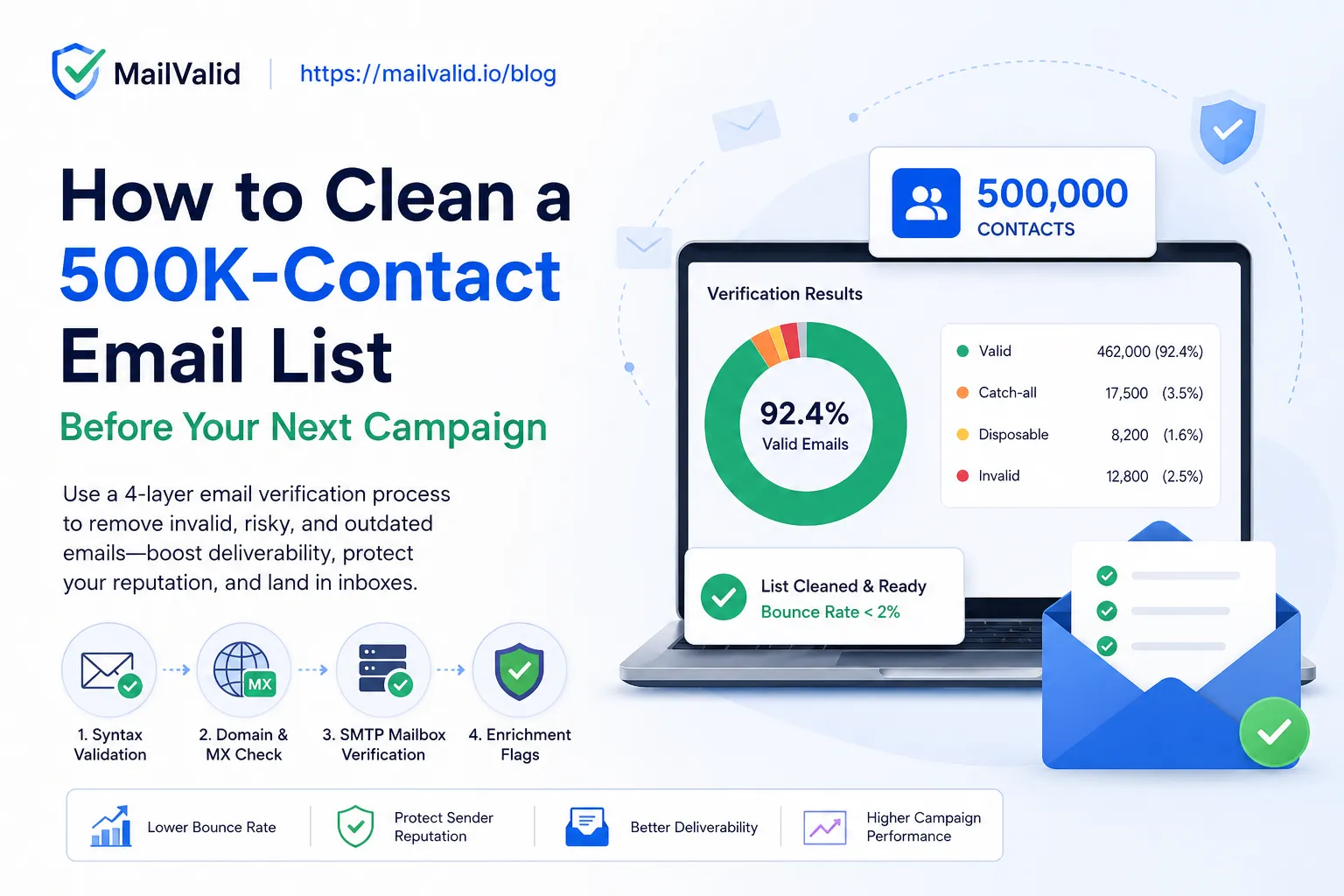
You have 500,000 contacts. You have a campaign launch date. And somewhere in the back of your mind, you have a nagging question: how many of those addresses are actually real?
If your list is 18 months old and you've never run a verification pass, the answer is uncomfortable. Email lists decay at 22–30% per year according to HubSpot's email marketing benchmarks — from job changes, domain shutdowns, and account deletions. A 500K list built over two years could contain 100,000–200,000 undeliverable addresses right now, today, before you send a single email.
That's not a deliverability problem. That's a reputation catastrophe waiting to happen. ISPs flag senders whose bounce rate exceeds 2%. At 25% list decay, your bounce rate would be 12x the safe threshold — enough to trigger spam filters, earn a domain blacklist entry, and poison your sending IP for every future campaign.
This guide walks you through exactly how to perform bulk email list cleaning on a 500K list before your next send, using a multi-layer verification process. By the end, you'll have a clean, segmented list, a bounce rate under 2%, and a campaign that lands in inboxes — not spam folders.
What Is Bulk Email List Cleaning?
Bulk email list cleaning is the process of running a large email list through multi-layer verification checks — syntax validation, domain/MX record lookup, and SMTP-level mailbox confirmation — to identify and remove invalid, disposable, or risky addresses before sending a campaign. It is distinct from real-time single-address validation and is typically done as a pre-campaign hygiene step on lists of 10,000+ contacts.
A clean list is one where every address has been confirmed to: (1) pass RFC 5322 syntax rules, (2) belong to a domain with valid mail exchange records, and (3) correspond to an active mailbox that accepts email via SMTP.
Why a Syntax Check Isn't Enough
This is the most common false assumption in list hygiene: that a quick regex validation or import-time format check is "good enough."
It isn't. A syntax check catches malformed addresses like user@ or user.domain.com. That's roughly 5% of bad addresses on a typical list. The other 95% of problems — defunct mailboxes, expired domains, catch-all configurations, disposable accounts, and role addresses that nobody reads — all pass a syntax check cleanly.
| Validation layer | What it catches | Share of bad addresses |
|---|---|---|
| Syntax (regex) | Malformed formats | ~5% |
| Domain/MX check | Non-existent domains, missing MX records | ~20% |
| SMTP mailbox verification | Dead mailboxes on valid domains | ~60% |
| Disposable/catch-all/role detection | Risky-but-deliverable addresses | ~15% |
Bottom line: If you only run a syntax check on your 500K list and it "passes," you're still flying blind on the 95% of problems that a full verification would surface.
What's Hiding in Your 500K List
Before you clean, it helps to understand what categories of bad addresses you're looking for:
- Invalid/non-existent mailboxes — The most common. The domain exists, but the specific mailbox has been deleted. Happens constantly as people change jobs, abandon old accounts, or let personal domains lapse. Causes hard bounces.
- Non-existent domains — The entire domain is gone. Bounces immediately and damages your sender score fast because it signals you're sending to stale data.
- Disposable addresses — Temporary emails from services like Mailinator, 10MinuteMail, or Guerrilla Mail. Created to bypass signups, typically invalid within hours. High bounce and zero engagement.
- Catch-all domains — Configured to accept mail for any address at that domain, even if no matching mailbox exists. Your message lands, but may go nowhere. These are "unknown" risk — you can't confirm delivery, only a flag.
- Role-based addresses —
info@,support@,noreply@,admin@. Technically deliverable but often read by no individual. High unsubscribe and spam complaint rates; suppressing them improves engagement metrics. - Free provider addresses gone stale — Old Gmail, Yahoo, and Outlook accounts that haven't been logged into in years. Often still "deliverable" but completely unengaged.
How to Validate an Email List: The 4-Layer Verification Process
Validating an email list properly requires four sequential checks. Each layer builds on the previous.
Step 1: Syntax Validation
The system checks that the address is formatted correctly against RFC 5322 standards — valid local part, @ symbol, valid domain format. Fast, cheap, and catches obvious entry errors. Removes addresses like firstname surname@domain.com or user@@domain.com.
Step 2: Domain Existence and MX Record Check
The system performs a DNS lookup to confirm (a) the domain exists and (b) it has valid mail exchange (MX) records pointing to a mail server. An address on a domain with no MX records can never receive email — period. This step safely removes a large category of permanently undeliverable addresses.
Step 3: SMTP Mailbox Verification
The system opens a connection to the domain's mail server and simulates the beginning of an email delivery — enough to get a response confirming whether the specific mailbox exists — without actually sending an email. This is the definitive check for "does this person still have this account?" It catches the 60% of bad addresses that pass all earlier checks.
Step 4: Enrichment Flags (Disposable, Role, Catch-all, Free Provider)
The system cross-references each address against known disposable email provider databases, detects role-based prefixes, flags catch-all domains, and identifies free email providers. These flags don't tell you an email is invalid — they tell you it's risky, enabling you to make segmentation decisions based on your campaign's risk tolerance.
How to Clean a 500K Email List with MailValid: Step-by-Step
MailValid's bulk email verification API runs all four layers in a single call per email, returning a structured JSON response with 10+ data points. Here's the full process for a 500K list.
Step 1: Export and Deduplicate Your List
Before uploading anything, deduplicate your list locally. Duplicates won't be charged by MailValid (they're free in bulk jobs), but removing them first means your results are cleaner to work with.
import pandas as pd

df = pd.read_csv("contacts.csv")
df["email"] = df["email"].str.lower().str.strip()
df = df.drop_duplicates(subset="email")
df.to_csv("contacts_deduped.csv", index=False)
print(f"Deduped: {len(df)} unique emails")
Step 2: Chunk the List into Batches
MailValid's Business tier handles up to 10,000 emails per bulk job. Split your 500K list into 50 batches of 10,000.
chunk_size = 10000
emails = df["email"].tolist()
chunks = [emails[i:i + chunk_size] for i in range(0, len(emails), chunk_size)]
print(f"Total batches: {len(chunks)}")  # 50 batches
Step 3: Submit Batches and Poll for Results
import requests, time, json

API_KEY = "mv_live_your_key_here"
BASE_URL = "https://mailvalid.io/api/v1"
results = []

for i, chunk in enumerate(chunks):
    # Submit bulk job
    resp = requests.post(
        f"{BASE_URL}/verify/bulk",
        headers={"X-API-Key": API_KEY, "Content-Type": "application/json"},
        json={"emails": chunk},
    )
    job_id = resp.json()["job_id"]

    # Poll until complete
    while True:
        status = requests.get(
            f"{BASE_URL}/verify/bulk/{job_id}",
            headers={"X-API-Key": API_KEY},
        ).json()
        if status["status"] == "completed":
            results.extend(status["results"])
            break
        time.sleep(5)
    print(f"Batch {i + 1}/50 done")

with open("verification_results.json", "w") as f:
    json.dump(results, f)
Step 4: Segment the Results
Each result includes a status field and enrichment flags. Segment based on your campaign's risk tolerance:
| Segment | Criteria | Action |
|---|---|---|
| Send | status: valid, is_disposable: false, is_role: false |
Include in campaign |
| Review | status: catch-all |
Optional include; suppress for cold sends |
| Suppress | status: invalid, is_disposable: true |
Remove immediately |
| Low-priority | is_role: true, is_free_provider: true |
Separate list; lower send priority |
import json

with open("verification_results.json") as f:
    results = json.load(f)

send = [r for r in results if r["status"] == "valid" and not r["is_disposable"] and not r["is_role"]]
review = [r for r in results if r["status"] == "catch_all"]
suppress = [r for r in results if r["status"] == "invalid" or r["is_disposable"]]

print(f"Send:     {len(send):,}")
print(f"Review:   {len(review):,}")
print(f"Suppress: {len(suppress):,}")
Step 5: Update Your CRM or ESP
Export the suppress segment as a suppression list and upload it to your CRM, ESP (Klaviyo, HubSpot, Mailchimp, etc.), or marketing automation tool before scheduling the campaign. Most ESPs accept a CSV of email addresses for suppression upload.
How Long Does It Take to Clean 500K Emails?
At MailValid's Business tier with 10,000 emails per bulk job:
- 50 batches to process 500K emails
- ~60–120 seconds per batch (network + SMTP handshake time)
- Total wall-clock time: 1–2 hours with a sequential script; 30–45 minutes with concurrent batch submissions
Run the script overnight before your campaign day and wake up to a clean, segmented list with zero campaign-day scramble.
The Cost of Cleaning 500K Emails in 2026
At $0.001/email (MailValid Business tier), cleaning 500K emails costs $375–500 — less than $1 per thousand contacts. Compare this against competitors:
| Service | 500K emails (est.) | Credits expire? | Notes |
|---|---|---|---|
| MailValid | ~$375–500 | Never | $0.00075/email at Business tier |
| ZeroBounce | ~$1,950 | Never | $0.0039/email est. |
| NeverBounce | ~$1,500 | 12 months | Credits lost if unused |
| DeBounce | ~$450 | Never | Lower SMTP accuracy |
| MillionVerifier | ~$500 | Never | Comparable range |
Prices estimated from official pricing pages as of June 2026. MailValid Business tier: 200,000 credits for $150 ($0.00075/email).
ROI framing: If your campaign budget is $10,000 and a bad send gets your domain blacklisted — triggering a deliverability rebuild that takes 4–6 weeks — the $375–500 cleaning cost is a rounding error. The question isn't whether to clean. It's which tool to use.
What to Do After You Clean: 4 Quick Wins
- Set up ongoing real-time verification at your intake forms. Cleaning a list once is table stakes. Preventing bad addresses from entering the list is the long game. Integrate MailValid's single-verification endpoint at signup, checkout, and lead form submission — sub-200ms response time means zero UX friction.
- Schedule quarterly re-verification on your active list. Even your validated list will decay 5–8% every 90 days. Run a batch re-verification before every major campaign.
- Set a bounce threshold alert in your ESP. Most enterprise ESPs (Klaviyo, HubSpot, SendGrid) let you pause a campaign if real-time bounce rate exceeds a threshold. Set it at 1.5% so you have a buffer before the 2% ISP flag zone.
- Separate catch-all results for re-engagement. Catch-all domains are unknowns, not failures. Keep this segment in a separate list. Test them with a low-volume re-engagement campaign; those who open get promoted to your main list.
Frequently Asked Questions
What is bulk email list cleaning?
Bulk email list cleaning is the process of verifying a large list of email addresses — typically 10,000 or more — to identify and remove invalid, disposable, or undeliverable contacts before sending a campaign. It uses multi-layer checks including syntax validation, DNS/MX lookup, and SMTP mailbox verification to confirm each address is real and active.
How long does it take to clean a 500K email list?
With MailValid's Business tier (10,000 emails per batch), cleaning a 500K list takes approximately 1–2 hours running sequentially, or 30–45 minutes with concurrent batch submissions. Results are returned as structured JSON and can be segmented and exported immediately after processing completes.
What is the difference between email validation and email verification?
Email validation refers to format and syntax checks — confirming an address matches the RFC 5322 standard. Email verification goes deeper: it confirms the domain has valid MX records and that the specific mailbox accepts email via SMTP handshake, without sending an actual message. Validation catches ~5% of problems; full verification catches 95%+.
How much does it cost to verify 500,000 emails?
At MailValid's Business tier ($0.00075/email for 200,000-credit packs), verifying 500,000 emails costs approximately $375–500. ZeroBounce charges approximately $1,950 for the same volume. MailValid credits never expire, so unused credits roll over to your next campaign.
What bounce rate should I target before sending a campaign?
The industry safe threshold is under 2% bounce rate. ISPs including Gmail and Outlook monitor sender bounce rates and apply spam filtering or temporary blocks to senders who exceed this threshold. For a 500K send, that means no more than 10,000 undeliverable addresses should remain in your list after cleaning.
What is a catch-all email domain?
A catch-all domain is configured to accept mail sent to any address at that domain — even addresses that don't exist as real mailboxes. SMTP verification returns inconclusive results for these domains because the server accepts the connection for all addresses. MailValid flags catch-all addresses separately so you can decide whether to include or suppress them based on your campaign's risk tolerance.
Can I use MailValid's API in Python, Node.js, or Go?
Yes. MailValid's REST API returns JSON responses and has documented code examples for Python, Node.js, Ruby, PHP, Go, and Java. The single-verification endpoint returns results in under 200ms; the bulk endpoint supports async job submission with webhook notifications on completion.
Is it safe to verify emails via SMTP without sending a real email?
Yes. SMTP verification uses a connection-and-abort technique — the verifier connects to the mail server, announces the recipient address, and disconnects before actually transmitting message content. This is a standard, widely-used practice in email hygiene and does not send any email to the address being verified.
Clean Your List Before the Campaign Clock Runs Out
A 500K send is a high-stakes moment. Every invalid address you send to chips away at the sender reputation you've spent months building. Every bounce over 2% pushes you closer to ISP flags, spam folder placement, and — in the worst case — domain blacklisting that can sideline your entire email program for weeks.
Bulk email list cleaning with MailValid takes 1–2 hours and costs under $500 for 500K contacts — with credits that never expire, so anything unused rolls into your next campaign.
- Start with 100 free credits — no credit card required
- View the bulk verification API docs
- See full pricing for large lists
Pricing figures sourced from official provider pricing pages as of June 2026.
MailValid Team
Email verification experts
Join teams that verify before they send
Stop letting bad emails hurt your deliverability
100 free credits. From $0.00075/email after. Credits never expire. No credit card required.