
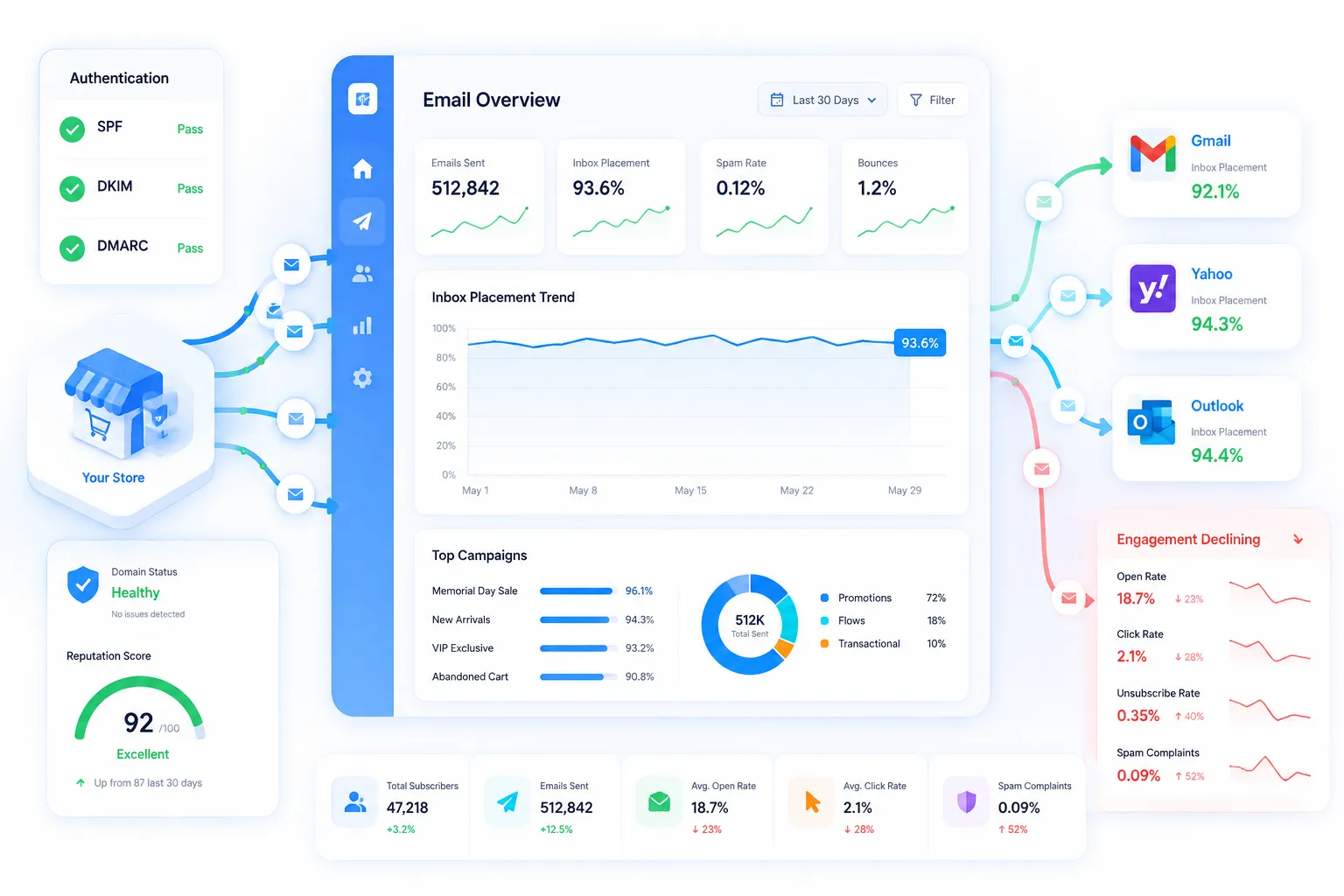
 An ecommerce brand has around 47,000 subscribers and sends campaigns through both Klaviyo and Mailchimp. Engagement has declined year over year, and the problem became obvious during a recent Memorial Day campaign.
The technical basics were already done. SPF and DKIM were correctly set up. A basic DMARC record was in place. Unsubscribe links were visible. PTR records were checked. Bounce rate stayed under 2%. BIMI was the one item left unconfirmed.
Despite all that, email wasn't driving much revenue. Was this a segmentation problem? Or a real deliverability problem tied to domain reputation? That's the hard part. The technical checklist gives no clear answer.
This is a useful case to study. It shows a pattern many ecommerce teams hit. Good technical setup. Declining results anyway. The cause is usually not where people look first.
Authentication Is Table Stakes Now
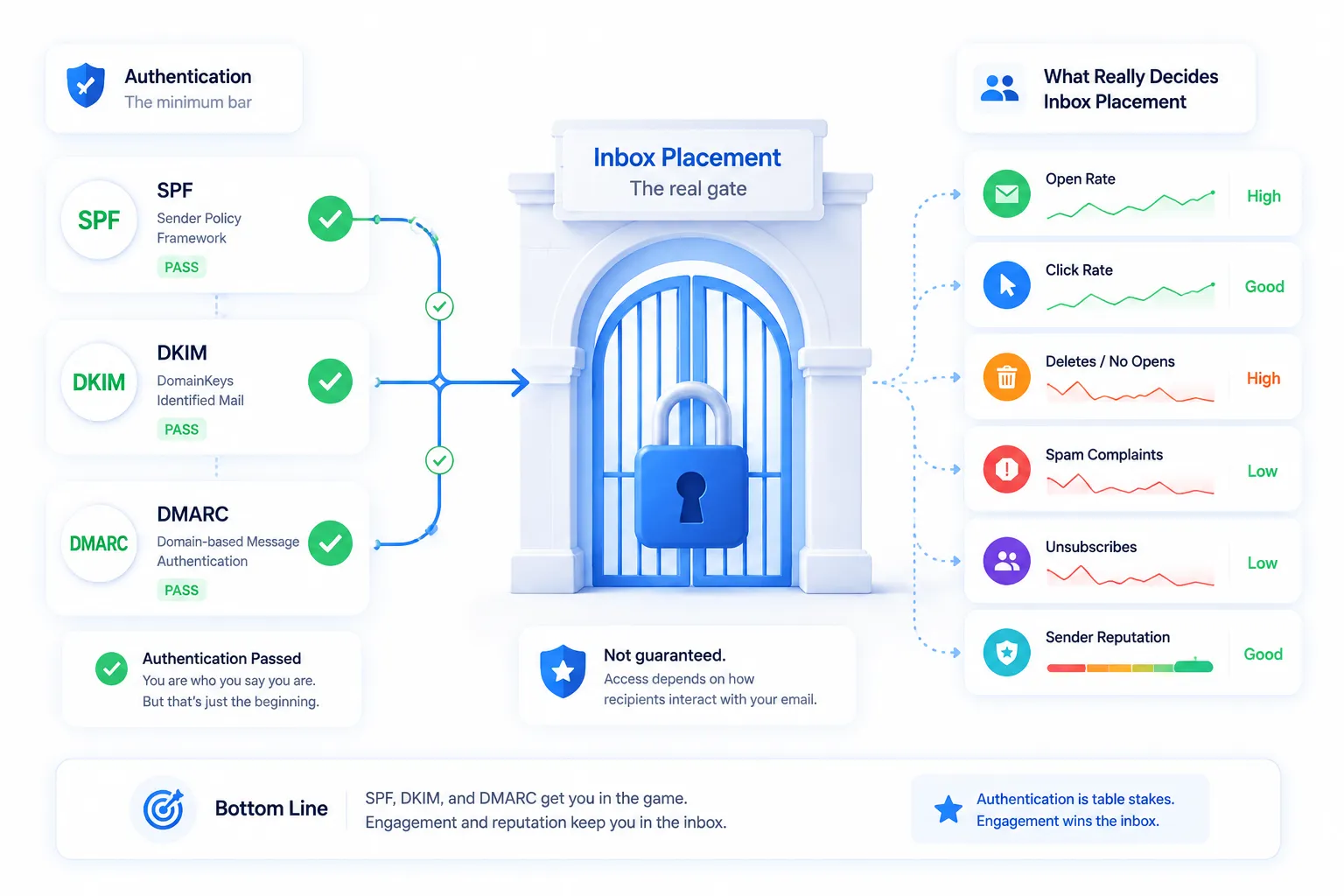
Here's the first key point. SPF, DKIM, and DMARC no longer set a sender apart. They are the minimum bar. Clearing that bar does not guarantee inbox placement.
This tracks with how mailbox providers now filter mail. Since 2024, Gmail and Yahoo have required authentication from any sender pushing 5,000+ messages a day. Most legitimate senders now clear that bar. Once everyone clears it, authentication stops being a differentiator.
So the filtering decision shifts. It leans on behavior instead. Engagement. Complaint rate. Reputation history. That shift is the real story behind most inbox placement drops today.
Deliverability Problem or Marketing Problem?
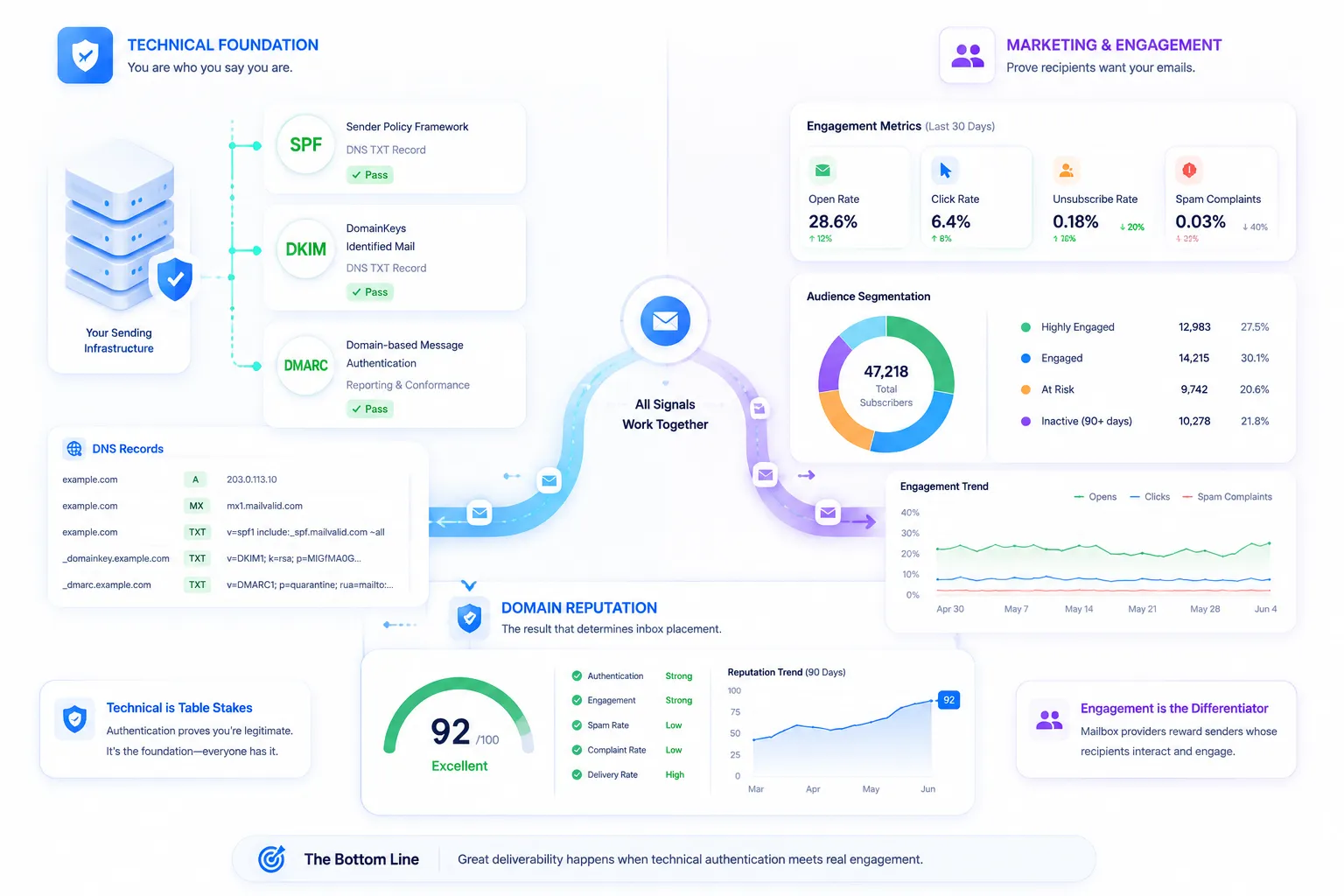
There's a real debate hiding in cases like this. Is a placement test even useful? If you test and find 92% inbox placement, what have you learned?
Not much, on its own. A single number means little without context. But a trend means a lot. If placement used to be 98% and it's now 82%, that's a real signal. Trend beats snapshot every time.
A second view worth naming: some experienced marketers argue most "deliverability" complaints are really list problems. The list got older. The offer got weaker. Segmentation got lazy. Tools don't fix any of that.
Put those two views together and a clearer diagnosis emerges. With authentication solid and bounce rate low, a steep year-over-year engagement drop usually points to one thing: sending too often to people who stopped caring. Gmail, Yahoo, and Outlook weight engagement heavily now. Opens. Clicks. Deletes without opening. Spam reports. Keep mailing an inactive segment, and the provider learns to deprioritize you. That hurts delivery to your engaged subscribers too.
Two ESPs, One Domain Reputation
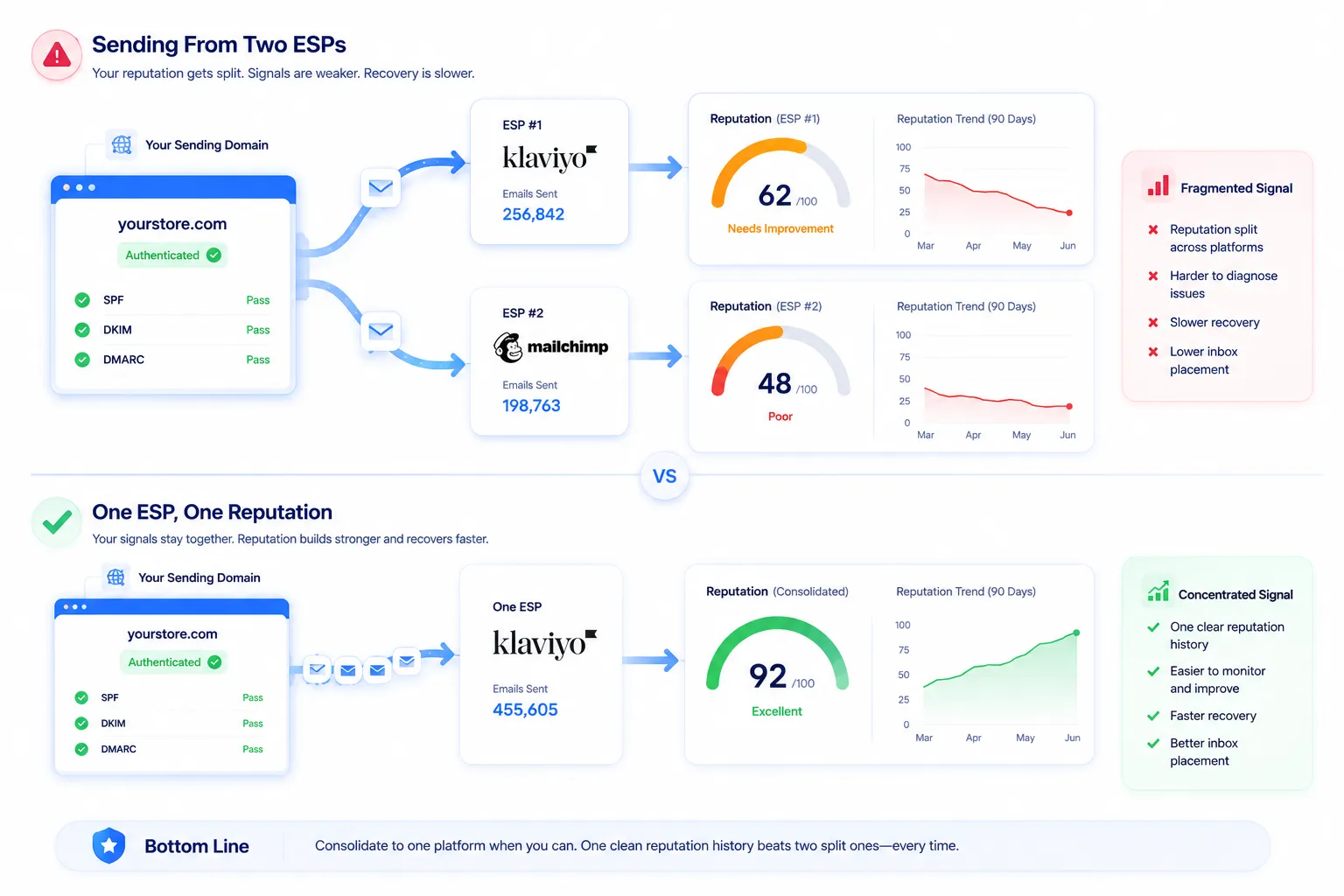
Here's a detail worth pulling out on its own. Sending through two platforms at once can hurt more than it helps. It splits your reputation signal instead of concentrating it. Consolidating to one platform keeps the data clean and simple for filters to read.
There's a related, sharper debate worth resolving here too. Is bad deliverability on a given platform an IP pool problem? Or a list hygiene problem? The honest answer: both can be true at once. A shared IP pool is a real, separate risk. Bad senders in the pool can drag down good senders sharing it. Managing that pool is the platform's job.
But list hygiene is a separate variable. It's the sender's job, regardless of platform. Fixing one doesn't make the other irrelevant.
Apply that here. Mailing the same aging list through two platforms doesn't spread the risk. It just splits one engagement problem into two harder-to-read reputation histories. That's the opposite of what you want when you're trying to diagnose a drop.
The "Deliverability Debt" Framework
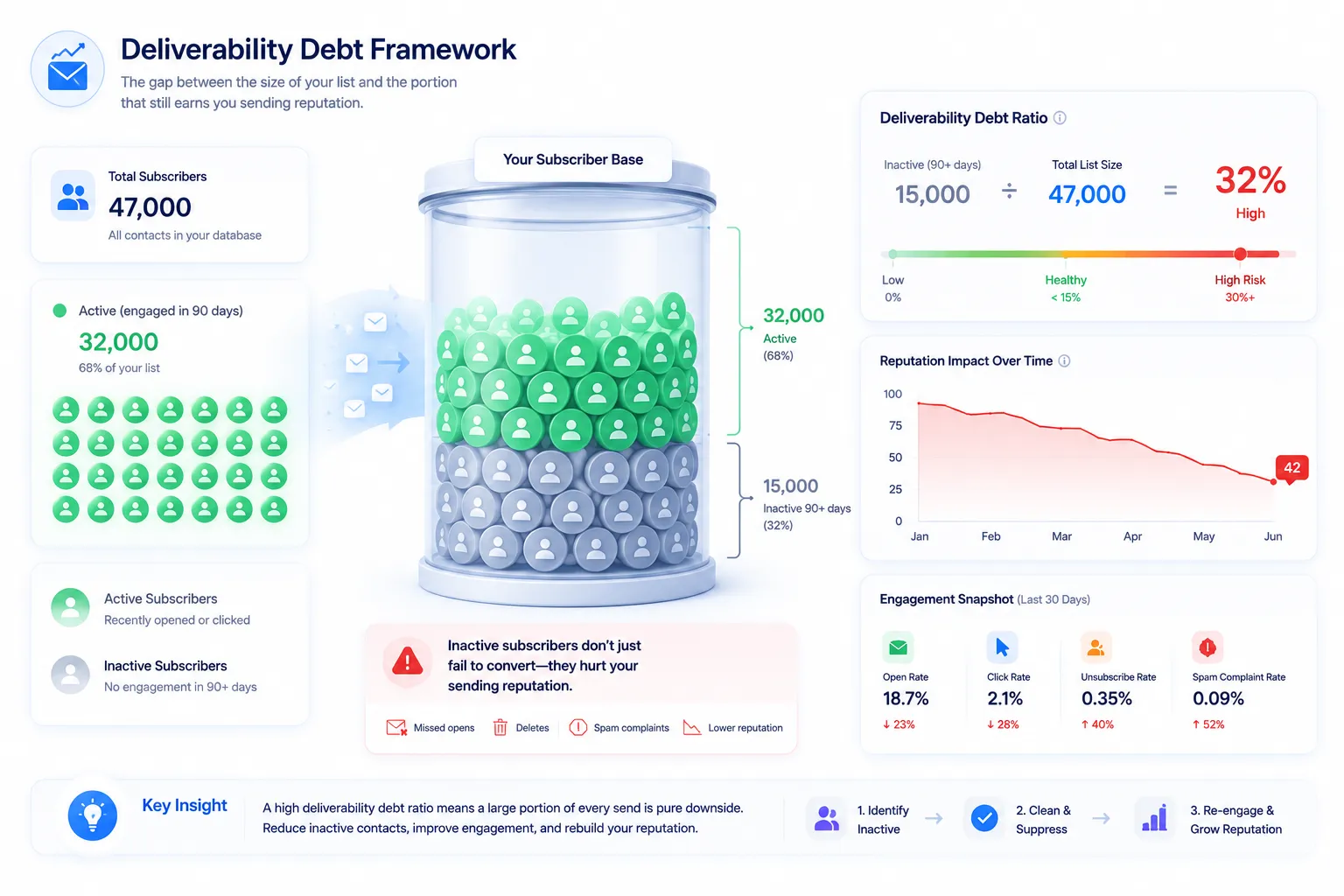 Here's a framework worth naming clearly. Call it deliverability debt. It's the gap between how big your list looks and how much of it still earns you sending reputation.
Any contact with zero engagement in 90+ days still counts toward your subscriber total. But it's not helping you reach an inbox anymore. It's a liability sitting on the books. Every send to that segment does more than fail to convert. It reports a negative signal: a missed open, a delete, sometimes a spam complaint. Providers factor that into your reputation score for the next send. That includes sends to your genuinely engaged subscribers.
This gives you a metric worth tracking:
Deliverability Debt Ratio = (contacts with zero engagement in the last 90 days) ÷ (total active list size)
Here's a simple example. Say a list has 47,000 contacts. Say 15,000 haven't engaged in 90+ days. That's a debt ratio near 32%. Nearly a third of every full-list send is pure downside, with no upside. (This is an illustrative example, not a claim about any specific store's real numbers.)
Track this ratio over time. Don't wait for a spam-rate dashboard to show the damage after it happens. That turns reputation management from reactive to predictive.
This also resolves a false choice. Is it a deliverability problem or a marketing problem? An aging, poorly segmented list is the deliverability problem. Engagement-based filtering means marketing quality and technical deliverability aren't separate anymore, not at the mailbox-provider level. "The content got weaker" and "domain reputation dropped" aren't competing explanations. They describe the same debt building up on the same list.
Detection Tools vs. Prevention Tools

Several tool categories get mentioned in discussions like this one: Google Postmaster Tools, Yahoo Sender Hub, Validity Everest, inbox placement testers, spam-trigger scanners, and SMTP log tools. Worth sorting them by what they actually do.
| Category | What it does | Examples | Limitation |
|---|---|---|---|
| Detection / monitoring | Reports reputation, spam rate, and inbox placement after sends have happened | Google Postmaster Tools, Yahoo Sender Hub, Validity Everest, inbox placement testers | Shows debt that already built up. Doesn't stop it from building again |
| Diagnostic / forensic | Checks message content, headers, and logs for spam triggers | Spam-trigger scanners, SMTP log tools | Good for ruling out content issues. Doesn't touch list-level decay |
| Prevention | Stops low-quality or dead engagement from entering sends in the first place | Verification and suppression workflows | Rarely automated. Usually done manually, if at all |
Even purpose-built monitoring tools often miss inactive-user detection. That gap shows up again and again in practitioner discussions. Monitoring tells you something is wrong. It doesn't fix the underlying list.
One more useful, current fact. Google recently retired its older Postmaster Tools dashboards for IP Reputation and Domain Reputation. Two new views replaced them: Compliance Status and Spam Rate. If your process still references the old dashboards, it's worth checking you're not looking at deprecated screenshots or stale guidance.
Where Email List Verification Fits In
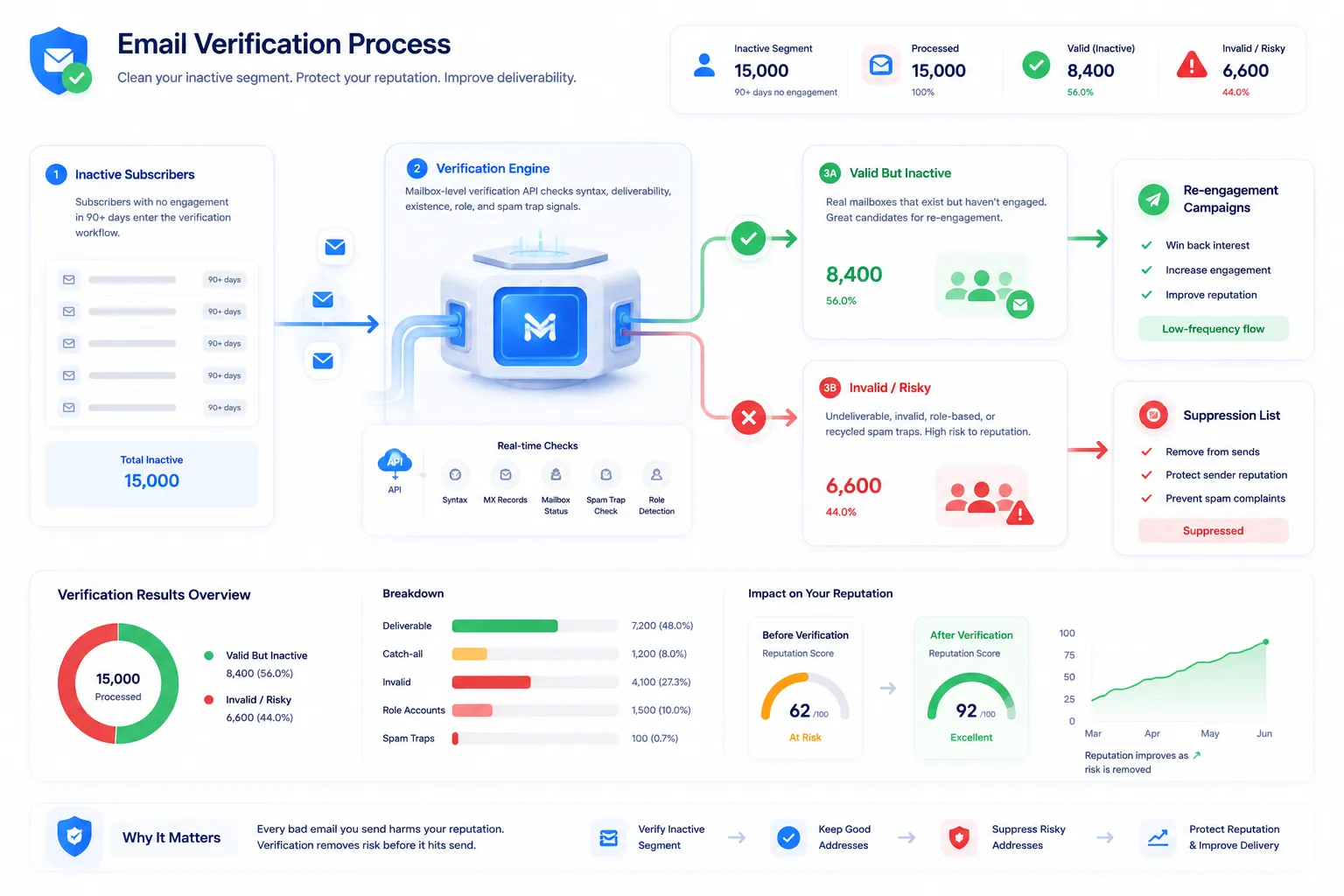 Elite email marketers recommend a common fix. Segment by recency. Suppress or re-engage anyone inactive for 90+ days. Then let placement recover over the next few weeks. But "inactive" isn't one category. It's at least two.
Some of that 90-day-inactive segment is cold, not dead. A real person who lost interest. Re-engagement flows can win some of them back. But some of that segment is genuinely dead. Job changes. Decommissioned role inboxes. Abandoned personal accounts. Mailboxes that quietly stopped existing. Re-engaging those wastes a send. It carries the same reputation cost as mailing a stale list.
This is where email verification does something engagement data alone can't. Run the inactive segment through mailbox-level verification before deciding its fate. Separate addresses that are truly undeliverable from ones that are simply disengaged. Email verification also catches a quieter risk: a mailbox that still accepts mail but has sat untouched long enough to become a recycled spam trap. It won't bounce. It will complain the next time you mail it.
Explore MailValid Alternatives
A Practical Diagnostic Checklist
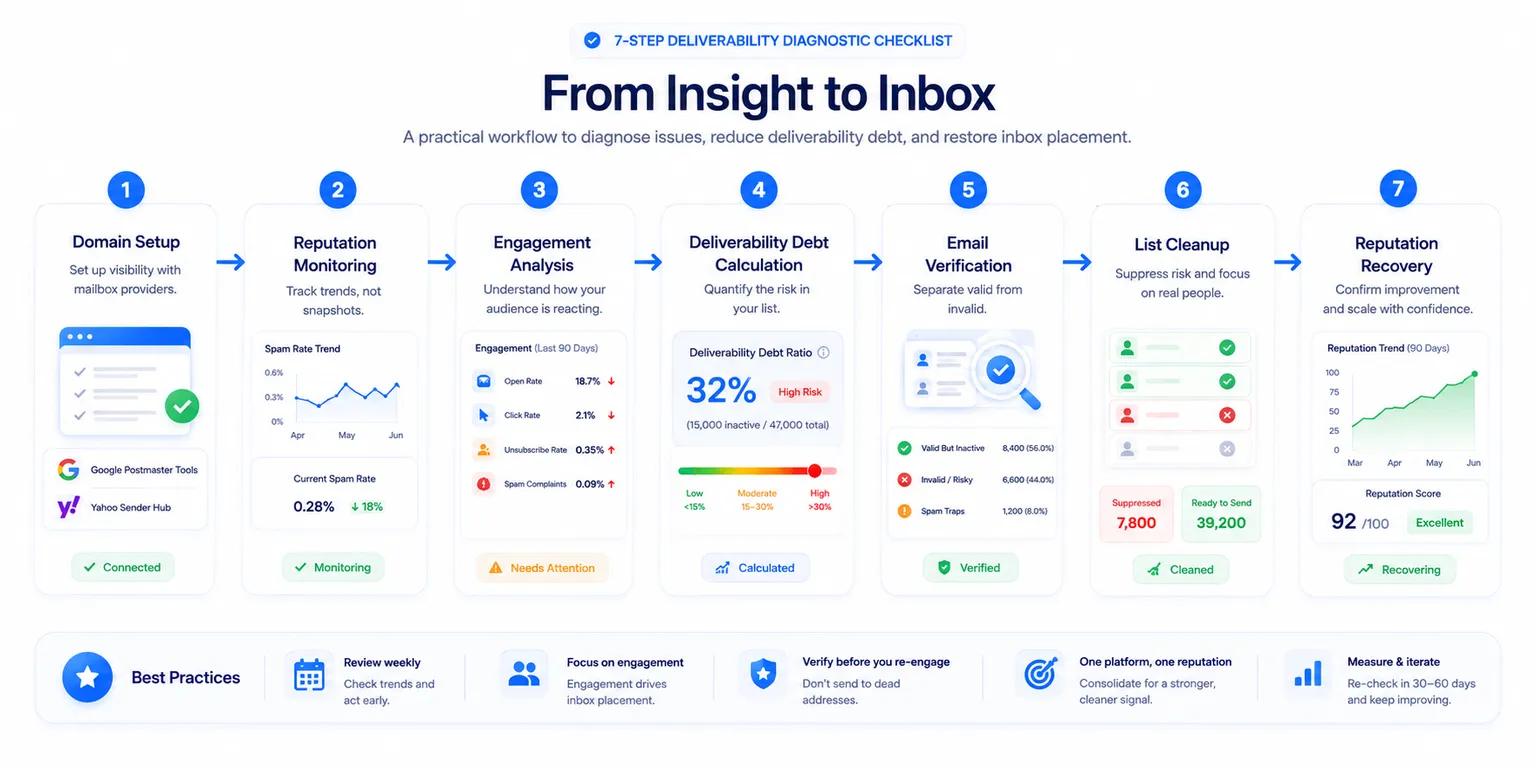
Here's the sequence worth running, in order.
- Set up Google Postmaster Tools and Yahoo Sender Hub for your sending domain, if you haven't. This is your only ground truth for spam-rate trend and compliance status.
- Pull the trend, not a snapshot. A small rising trend matters more than any single number.
- Calculate your deliverability debt ratio. What share of your list has zero engagement in 90 days?
- Verify that inactive segment. Separate dead addresses from disengaged-but-valid ones.
- Suppress the dead addresses outright. Move the disengaged-but-valid ones into a low-frequency re-engagement flow.
- Consolidate to one sending platform, if you can. One clear reputation history beats two split ones.
- Re-check placement and spam rate 30-60 days later. Confirm recovery before scaling volume back up.
Frequently Asked Questions
Why would emails go to spam if SPF, DKIM, and DMARC are all set up correctly? Authentication proves you are who you say you are. It doesn't prove people want your mail. Once a sender clears the authentication bar, mailbox providers weigh engagement more heavily — opens, clicks, deletes, complaints. A fully authenticated domain can still lose inbox placement if engagement keeps dropping.
Does sending from two ESPs at once hurt deliverability? It can. It splits your reputation signal across two histories instead of one clear record. It doesn't reduce your risk. If the same aging list gets mailed through both platforms, the same engagement problem shows up twice, just harder to diagnose.
What is a "deliverability debt ratio"? It's the share of your list with zero engagement in the last 90 days, divided by total list size. A high ratio means a large chunk of every send is pure reputation risk with no engagement upside.
Is a shared IP pool bad for deliverability? It's one real risk factor. Other senders on the pool can hurt your delivery, even if your own practices are clean. Managing the pool is the platform's job. But your own list hygiene is a separate job. Fixing one doesn't remove the need to fix the other.
Should you suppress every subscriber who hasn't opened an email in 90 days? Not automatically. Some of that group is disengaged but still reachable — good candidates for re-engagement. Some of it is dead — invalid or abandoned addresses that should be suppressed outright. Verify the segment first. That way you don't waste sends, or reputation, on addresses that were never going to respond.
What's the difference between an inbox placement test and Google Postmaster Tools? A placement test shows where one campaign landed, at one point in time, across test inboxes. Postmaster Tools shows your domain's spam-rate trend over time, based on real recipient behavior. A single placement score means little on its own. Compared against your own history, it's genuinely useful.
MailValid Team
Email verification experts
Join teams that verify before they send
Stop letting bad emails hurt your deliverability
100 free credits. From $0.0008/email after. Credits never expire. No credit card required.