
New on Google Workspace Marketplace
Verify email addresses right in Google Sheets
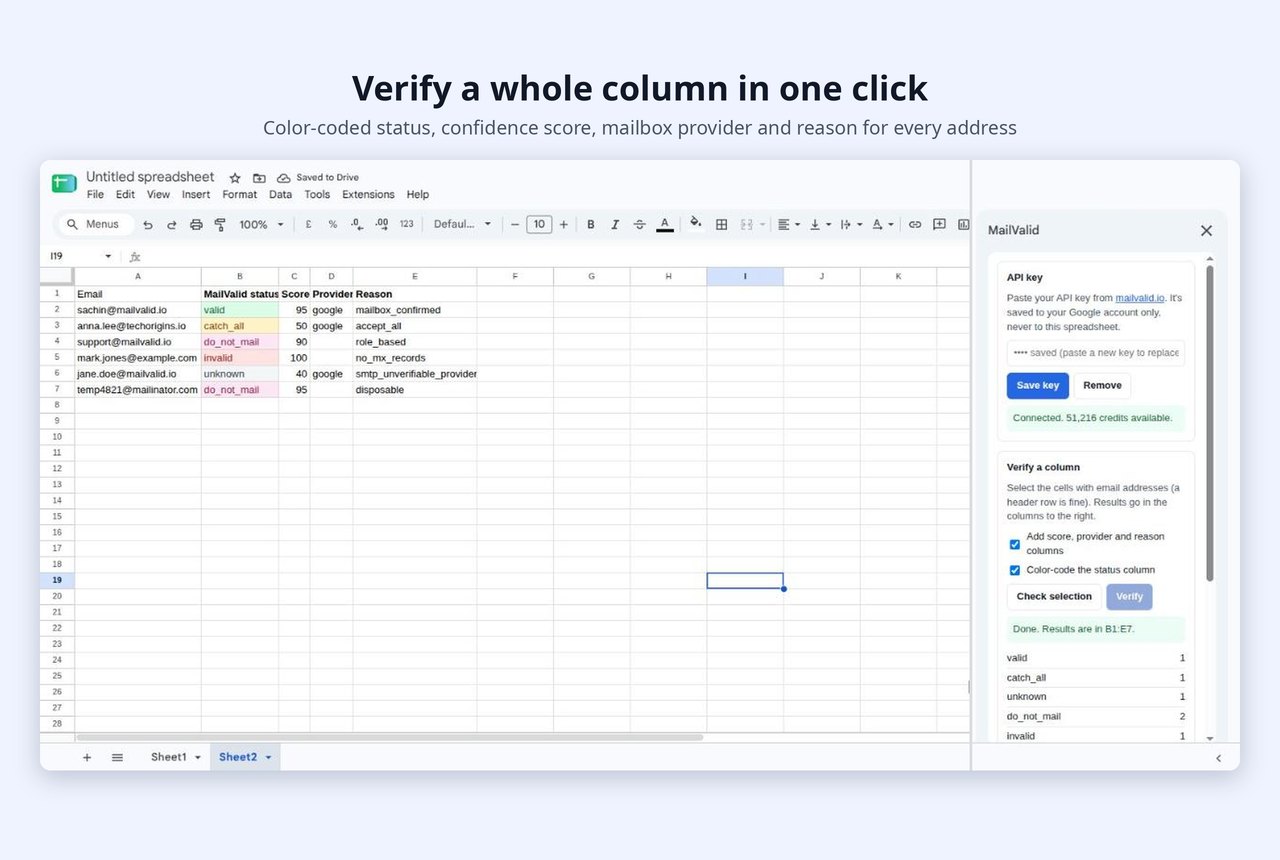
Select a column, click Verify, and see which addresses will bounce, before you send a single email. No CSV exports, no uploads, no switching tabs.
Free to install · 100 free credits · Unknown results are never charged
Built for people who live in spreadsheets
Sales teamsCheck a prospect list before it goes into your outreach tool, so bounces don't hurt your sending domain.
MarketersClean an event, webinar or lead-magnet list before you import it into your email platform.
AgenciesVerify client lists in the sheet they shared with you, and hand it back cleaned.
Recruiters and foundersCheck a handful of addresses before an important email goes out.
Clean a list in three steps
-
1
Install the add-on. Install MailValid from the Google Workspace Marketplace. Then open any spreadsheet and go to Extensions → MailValid → Verify emails.
-
2
Paste your API key. Copy your API key from your MailValid dashboard and paste it into the sidebar. Do this once. The key is saved to your Google account, never to the spreadsheet, so sharing a sheet never shares your key.
-
3
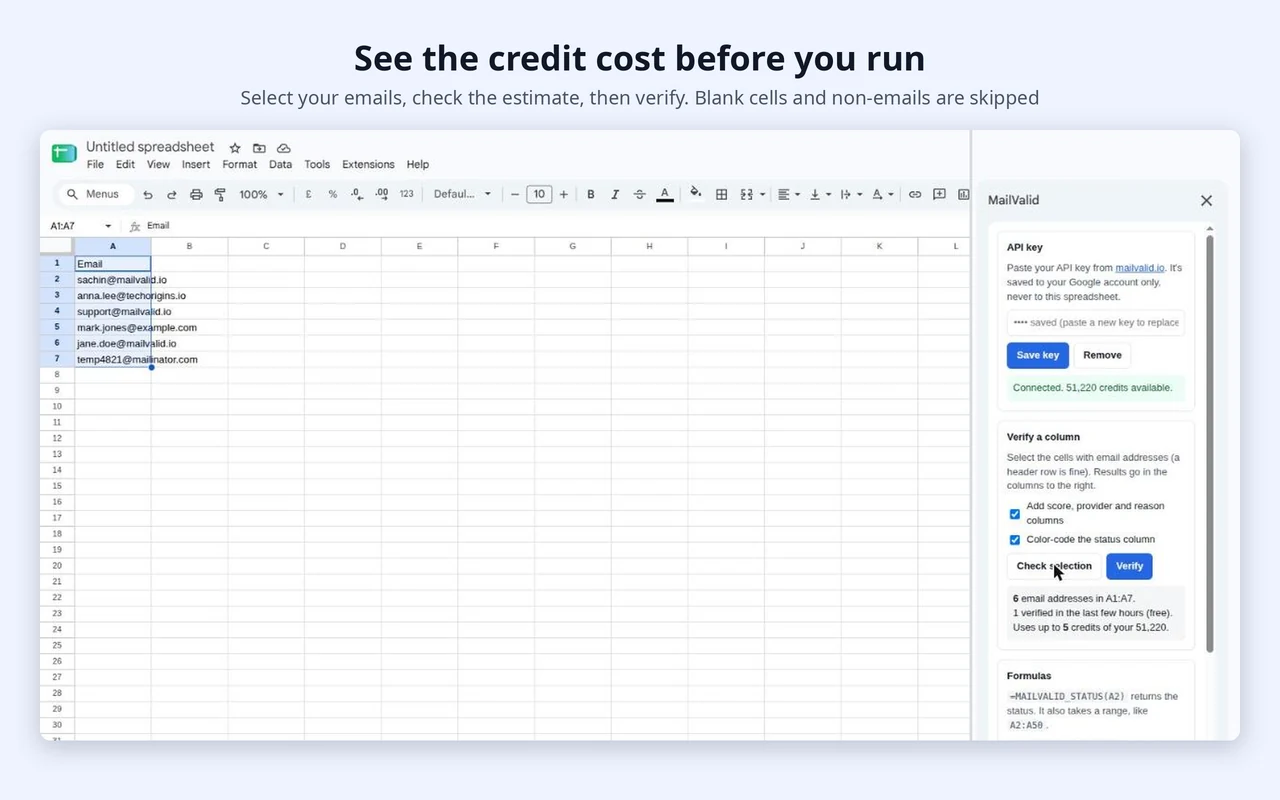
Select a column and click Verify. Select the cells with email addresses (a header row is fine) and click Check selection. MailValid shows how many credits the list will use and how many you have. Click Verify, and the results appear in the columns to the right.
Every row gets a clear answer
Each address gets four columns:
| Column | What it shows |
|---|---|
| Status | valid, invalid, catch_all, unknown or do_not_mail, color-coded |
| Score | A 0–100 confidence score |
| Provider | The mailbox provider, such as Google or Microsoft |
| Reason | Why it got that status, such as mailbox_confirmed, no_mx_records or disposable |
| Status | What it means |
|---|---|
| 🟢 valid | The mailbox exists and accepts mail. Safe to send. |
| 🔴 invalid | The mailbox or domain doesn't exist. Remove it. |
| 🟡 catch_all | The domain accepts every address, so delivery isn't certain. Send carefully. |
| ⚪ unknown | The mail server didn't give an answer. No credit is charged. |
| 🟣 do_not_mail | Role-based (like support@), disposable or otherwise risky. Usually best left out of campaigns. |
Below the results, the sidebar shows a count of each status, so you know how clean the list is at a glance.
Or use a formula
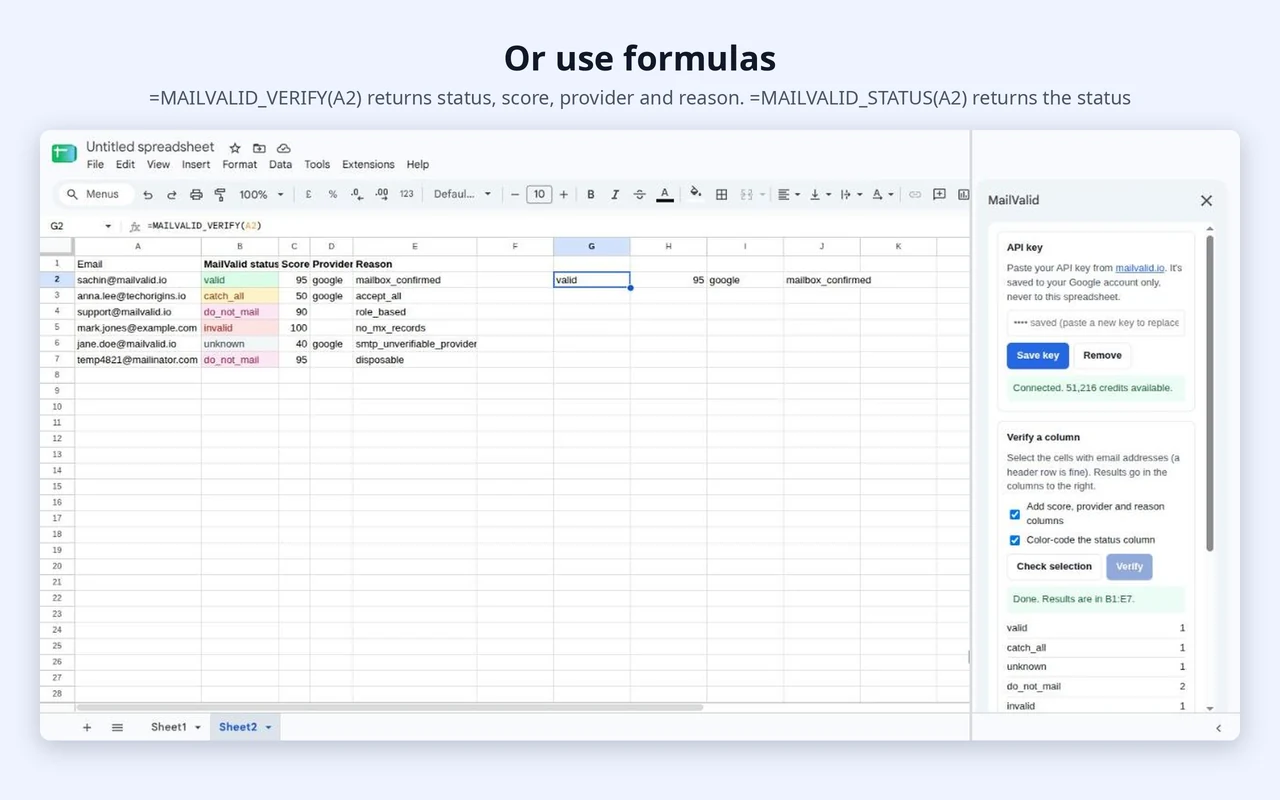
Prefer formulas? Type them like any other Sheets function:
| Formula | What it returns |
|---|---|
| =MAILVALID_STATUS(A2) | The status of one address. It also accepts a range, like A2:A50. |
| =MAILVALID_VERIFY(A2) | Fills four cells: status, score, provider and reason. |
Formulas work best for up to 200 addresses at a time. For bigger lists, use the sidebar.
Made for messy, real-world spreadsheets
Big listsVerify thousands of rows in one go.
No surprise chargesYou see the credit cost before every run.
No lost dataMailValid warns you before it writes over existing cells.
Skips the junkBlank cells and text that isn't an email address are skipped, not charged.
Duplicates charged onceIf an address appears twice, you pay for one check.
Recent checks are freeAddresses you verified in the last few hours aren't charged again.
Works with several Google accountsIf you're signed in to more than one account and the sidebar can't connect, use Extensions → MailValid → Quick verify selected column. It does the same job without the sidebar.
More than a syntax check
Every address goes through:
- Syntax check
- Domain and MX record lookup
- SMTP mailbox check
- Catch-all detection
- Disposable address detection
- Role-based address detection (info@, sales@, support@)
- Free email provider detection
Pay for what you verify
- 100 free credits when you sign up. No card required.
- One credit = one address. Unknown results are free.
- Pay as you go from $8 for 2,000 credits.
- Credits never expire. No subscription.
The add-on itself is free to install. See pricing →
Your spreadsheet stays yours
- The add-on can only open the spreadsheet you're working in, not your other files.
- It reads only the cells you select or reference in a formula.
- Only the email addresses are sent to MailValid for verification. Nothing else in your sheet is sent.
- Your API key is stored in your own Google account, not in the sheet.
FAQ
Is the add-on free?
Yes, it's free to install. Verifications use MailValid credits. You get 100 free when you sign up, and more start at $8 for 2,000.
Where do I find my API key?
In your MailValid dashboard, under API keys. Copy it and paste it into the add-on's sidebar.
How many emails can I verify at once?
Thousands of rows with the sidebar. Formulas handle up to 200 addresses per range.
Will it overwrite my data?
Results go into the columns to the right of your selection. If those cells already have data, MailValid warns you before writing.
Am I charged for duplicates or blank cells?
No. Each unique address is charged once. Blank cells and text that isn't an email address are skipped. Unknown results are free.
The sidebar says it couldn't connect to my account. What do I do?
This happens when you're signed in to more than one Google account in the same browser. Use Extensions → MailValid → Quick verify selected column instead, or sign out of the other accounts and reopen the sheet.
Does it work with Google Workspace accounts?
Yes. It works with personal Gmail accounts and Google Workspace accounts. Workspace admins can also install it for their whole team.
Can my teammates use my key if I share the sheet?
No. The key is saved to your Google account, not the sheet. Each person adds their own key.
Does a valid result mean someone agreed to hear from me?
No. A result tells you whether an address can receive mail. It doesn't prove identity, consent to be contacted, or guaranteed delivery. Follow the email laws that apply to you.
Clean your next list in under a minute
Step-by-step guide · Setup reference · Need help? Contact support