
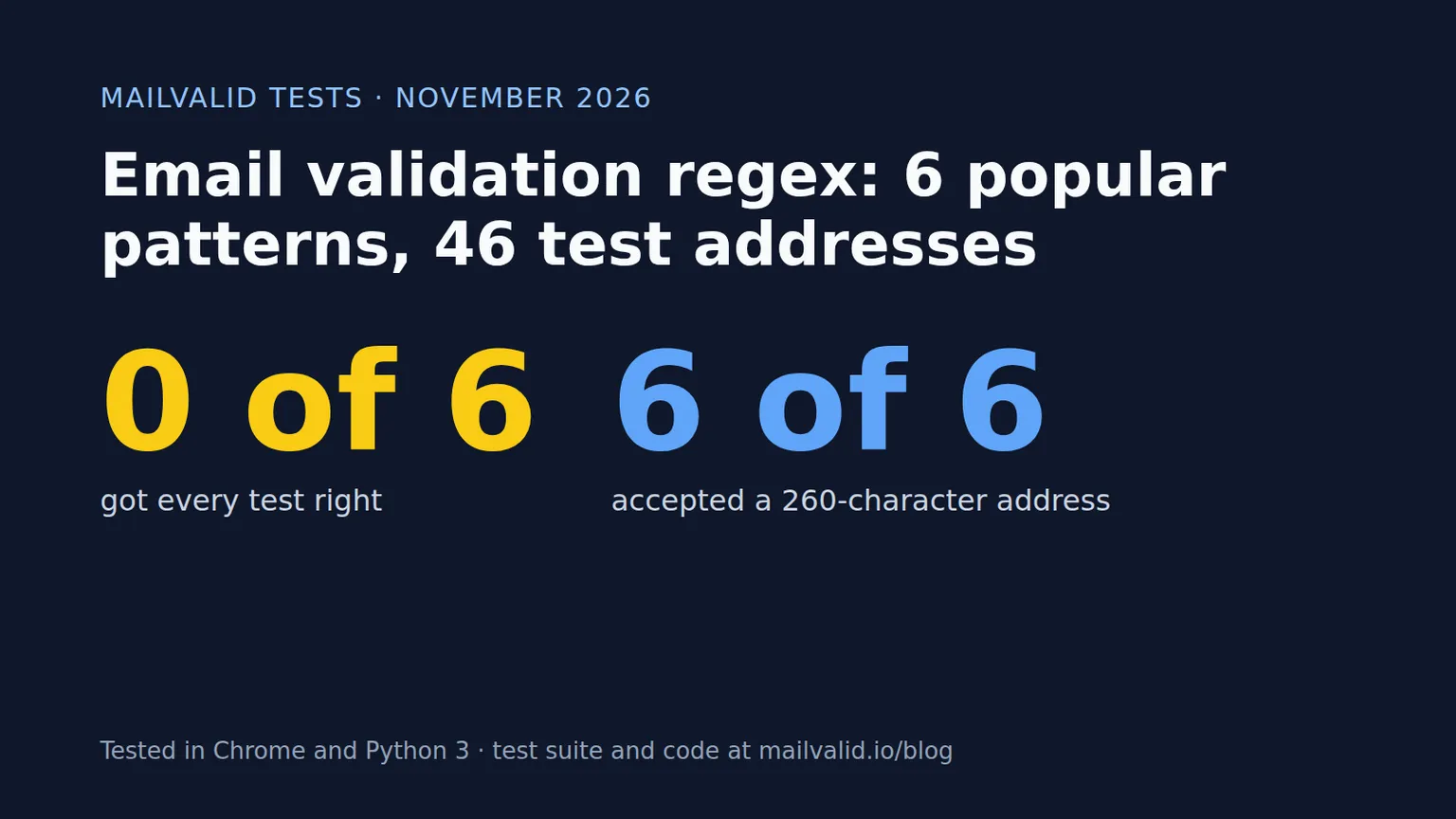
If you search for an email validation regex, you'll find dozens of patterns, each one presented as the right answer. We took six of the most widely copied ones and ran them against the same 46 test addresses, in both JavaScript (Chrome 155) and Python 3.14.
None of the six got every test right. All six accepted a 260-character address, longer than the email standards allow. Two of them reject real people with apostrophes in their names.
Below are the results, the specific mistakes each pattern makes, and a validator for JavaScript and Python that passed every test.
The short answer
If you just want something to paste: use the pattern browsers themselves use for <input type="email"> (from the HTML spec), require at least one dot in the domain, and add three checks in code: total length, local-part length, and dot placement. The full code, for JavaScript and Python, is further down.
And whichever regex you pick, remember what it can't do. A regex checks that an address is shaped like an email. It can't tell you whether the mailbox exists.
The six patterns we tested
We copied each pattern exactly as published, from the source most people copy it from.
| Pattern | Source | The pattern |
|---|---|---|
| Simple | Stack Overflow answer (1,385 votes) | ^[^\s@]+@[^\s@]+\.[^\s@]+$ |
| regular-expressions.info | regular-expressions.info/email.html | ^[A-Z0-9._%+-]+@[A-Z0-9.-]+\.[A-Z]{2,}$ (case-insensitive) |
| OWASP | OWASP Validation Regex Repository | ^[a-zA-Z0-9_+&*-]+(?:\.[a-zA-Z0-9_+&*-]+)*@(?:[a-zA-Z0-9-]+\.)+[a-zA-Z]{2,}$ |
| Stack Overflow accepted (JS) | Accepted answer to "How can I validate an email address in JavaScript?" (6,668 votes) | Long pattern with a quoted-string branch and an IP-literal branch |
| WHATWG / HTML spec | HTML Living Standard | The pattern behind <input type="email"> |
| RFC 5322 | Stack Overflow answer, also on emailregex.com | Long "RFC 5322 official standard" pattern (case-insensitive) |
Two notes on how we ran them. The regular-expressions.info pattern is published with word boundaries for finding emails in text; the page itself says to swap them for ^ and $ anchors when validating input and to turn on case-insensitive matching, so we did both. The Stack Overflow accepted answer lowercases the input before matching, so we did that too.
The test addresses
We wrote 46 test addresses in three groups:
16 valid addresses that a signup form should accept. These include plus addressing (user+newsletter@example.com), an apostrophe (o'brien@example.ie), a long TLD (.photography), a punycode domain and TLD, a 64-character local part (the maximum), and less common but legal characters such as & and =.
25 invalid addresses that break a rule in RFC 5321, RFC 5322 or DNS naming rules. These include missing parts, double @, leading, trailing or consecutive dots, spaces, hyphens at the start or end of a domain label, an underscore in the domain, one-letter and all-numeric TLDs, a 65-character local part, a 64-character domain label and a 260-character address.
5 edge cases that are technically valid but rare, such as quoted local parts and IP address literals. We report how each pattern handled these but didn't score them, because reasonable people disagree about whether a signup form should accept them.
The limits we used come straight from the standards. RFC 5321 caps the local part (before the @) at 64 octets and the full path at 256 octets including the angle brackets, which leaves 254 characters for the address. RFC 1035 caps each domain label at 63.
Results
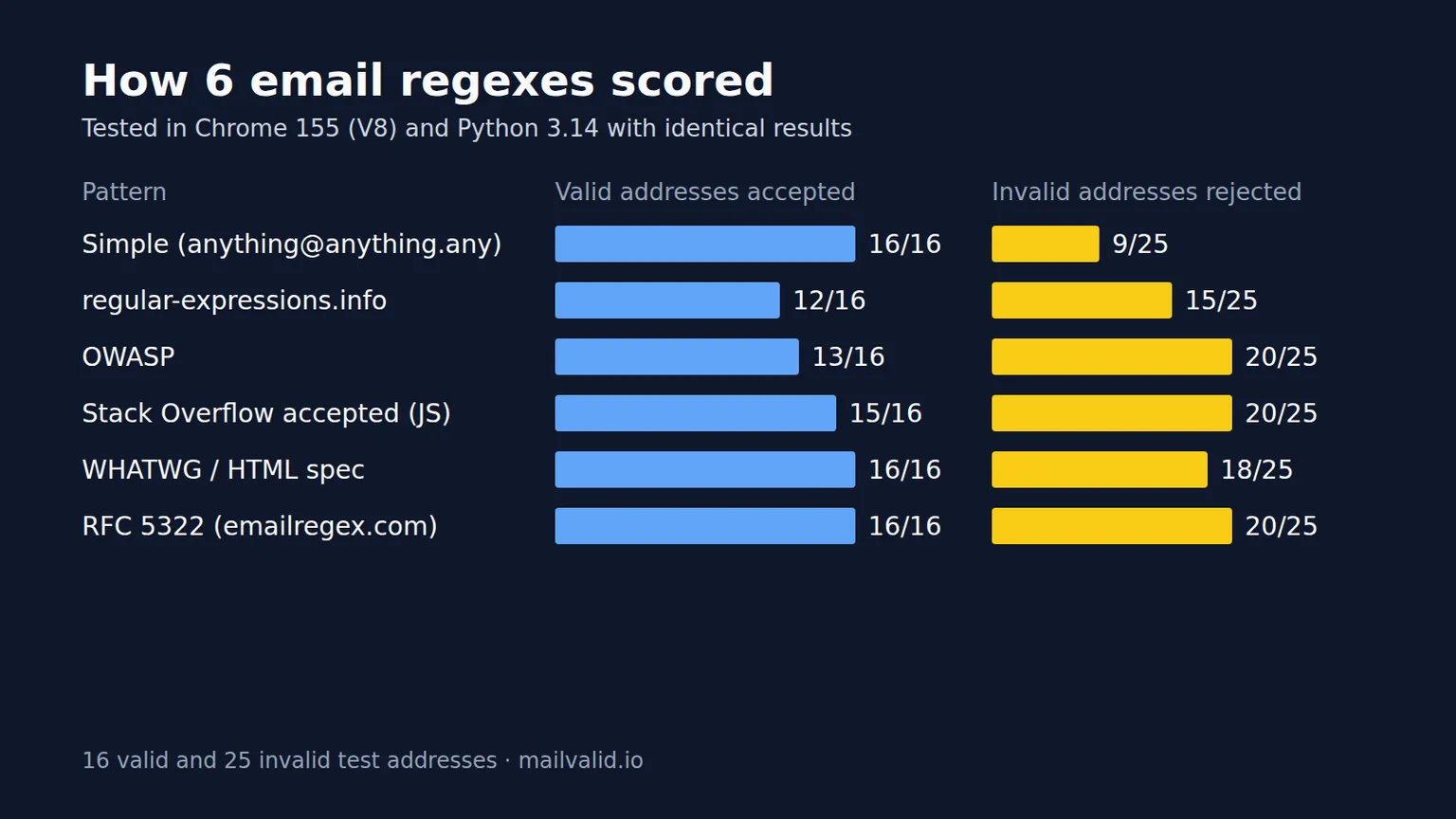
| Pattern | Valid accepted (of 16) | Invalid rejected (of 25) |
|---|---|---|
| Simple | 16 | 9 |
| regular-expressions.info | 12 | 15 |
| OWASP | 13 | 20 |
| Stack Overflow accepted (JS) | 15 | 20 |
| WHATWG / HTML spec | 16 | 18 |
| RFC 5322 | 16 | 20 |
JavaScript and Python gave identical results for every pattern on every address.
The two numbers measure different kinds of harm. A missed valid address is a real person who can't sign up. A missed invalid address is junk that gets into your database and later bounces. For a signup form, the first kind is usually worse, which is why we'd rule out any pattern that scores below 16 in the first column.
What each pattern gets wrong
Simple never rejects a real address, but it lets through 16 of the 25 invalid ones, including dots in the wrong places, hyphens at the edges of domain labels, an underscore in the domain, user<script>@example.com, a one-letter TLD and all three over-length addresses. It works as a "did they type something email-like?" check and not much more.
regular-expressions.info rejects four valid addresses: o'brien@example.ie, a&b@example.com, user=name@example.com and the punycode TLD user@example.xn--p1ai (the internationalised .рф). Its character list for the local part doesn't include ', & or =, and its TLD part only allows letters. It also accepts leading, trailing and doubled dots in the local part, leading and doubled dots in the domain, and domain labels that start or end with a hyphen. The author is upfront that the pattern reflects a trade-off; it just isn't the trade-off most signup forms want.
OWASP rejects the apostrophe, = and the punycode TLD, so it blocks people named O'Brien or D'Angelo. It also accepts domain labels that start or end with a hyphen.
Stack Overflow accepted (JS) misses only the punycode TLD among valid addresses, because its TLD part is [a-zA-Z]{2,}. It accepts hyphens at the edge of domain labels. It also has a bug in its quoted-string branch: the pattern has .(".+") where it presumably meant (".+"). In our test it rejected "john doe"@example.com but accepted x"john doe"@example.com, which isn't a valid address.
WHATWG / HTML spec accepts every valid address. It misses seven invalid ones: leading, trailing and consecutive dots in the local part, one-letter and all-numeric TLDs, and the two over-length addresses that a regex can't sensibly measure. It also accepts user@localhost, because it doesn't require a dot in the domain. The spec is deliberate about this. It calls its definition "a willful violation of RFC 5322", written to match what people actually type rather than everything the RFC technically allows.
RFC 5322 comes closest of the six: every valid address accepted, 20 of 25 invalid ones rejected. It misses the one-letter TLD, the numeric TLD and all three length tests. It's also the hardest of the six to read and maintain.
The test every pattern failed
All six patterns accepted a 65-character local part and a 260-character address. A regex is a poor tool for counting length across a whole string, and none of these patterns try. If you want to enforce the RFC limits, do it in code.
Edge cases
| Address | Simple | r-e.info | OWASP | SO accepted | WHATWG | RFC 5322 |
|---|---|---|---|---|---|---|
"john doe"@example.com |
No | No | No | No | No | No |
user@[192.168.0.1] |
Yes | No | No | Yes | No | Yes |
user@localhost |
No | No | No | No | Yes | No |
josé@example.com |
Yes | No | No | Yes | No | No |
user@bücher.example |
Yes | No | No | No | No | No |
Even the "RFC 5322" pattern rejects "john doe"@example.com. Its quoted-string branch doesn't allow a plain space, although RFC 5322 does allow one through its folding-whitespace rule.
josé@example.com is valid only for mail systems that support internationalised email (RFC 6531). If you need to accept it, a regex alone won't get you there.
What the browser does on its own
We also tested Chrome's built-in <input type="email">, which uses the WHATWG definition. It accepted all 16 valid addresses and behaved like the WHATWG pattern, with one difference: it treated " user@example.com", "user@example.com " and "user@example.com\n" as valid. The field strips surrounding whitespace and line breaks before it checks.
That's a reasonable choice for user input, and it's a reminder to trim the value on your server as well. Don't rely on the browser check by itself: anyone can send a request to your API without going through the form.
A Python gotcha: $ and newlines
In Python, $ matches at the end of the string or just before a trailing newline. So this passes with every one of the six patterns:
import re
pattern = r"^[^\s@]+@[^\s@]+\.[^\s@]+$"
re.match(pattern, "user@example.com\n")   # matches
re.fullmatch(pattern, "user@example.com\n")  # None
In JavaScript, $ (without the m flag) only matches at the very end, so all six patterns rejected the trailing newline there. In Python, use re.fullmatch or end your pattern with \Z. Our tests used end-of-string matching in both languages, so the newline gotcha didn't affect the scores above.
The validator we recommend
This starts from the WHATWG pattern, changes one * to + so the domain must contain at least one dot, and adds the checks a regex handles badly. It accepted all 16 valid addresses and rejected all 25 invalid ones, in both languages.
Treat that as "passes this test set", not "perfect": we wrote it knowing the tests. The full test set is listed in this post so you can run it against your own code.
JavaScript
const EMAIL_RE = /^[a-zA-Z0-9.!#$%&'*+\/=?^_`{|}~-]+@[a-zA-Z0-9](?:[a-zA-Z0-9-]{0,61}[a-zA-Z0-9])?(?:\.[a-zA-Z0-9](?:[a-zA-Z0-9-]{0,61}[a-zA-Z0-9])?)+$/;
const TLD_RE = /^(?:[a-zA-Z]{2,63}|xn--[a-zA-Z0-9-]{1,59})$/;

function isValidEmail(email) {
  if (email.length > 254 || !EMAIL_RE.test(email)) return false;
  const at = email.lastIndexOf('@');
  const local = email.slice(0, at);
  const domain = email.slice(at + 1);
  if (local.length > 64 || local.startsWith('.') || local.endsWith('.') || local.includes('..')) return false;
  return TLD_RE.test(domain.slice(domain.lastIndexOf('.') + 1));
}

isValidEmail(input.value.trim());
Python
import re

EMAIL_RE = re.compile(
    r"[a-zA-Z0-9.!#$%&'*+/=?^_`{|}~-]+"
    r"@[a-zA-Z0-9](?:[a-zA-Z0-9-]{0,61}[a-zA-Z0-9])?"
    r"(?:\.[a-zA-Z0-9](?:[a-zA-Z0-9-]{0,61}[a-zA-Z0-9])?)+"
)
TLD_RE = re.compile(r"[a-zA-Z]{2,63}|xn--[a-zA-Z0-9-]{1,59}")


def is_valid_email(email: str) -> bool:
    if len(email) > 254 or not EMAIL_RE.fullmatch(email):
        return False
    local, domain = email.rsplit("@", 1)
    if len(local) > 64 or local.startswith(".") or local.endswith(".") or ".." in local:
        return False
    return bool(TLD_RE.fullmatch(domain.rsplit(".", 1)[1]))


is_valid_email(user_input.strip())
What it deliberately rejects: quoted local parts, IP address literals, dotless domains like localhost, and non-ASCII addresses. That's the right call for most signup forms. If you run an internal system that needs any of those, loosen it on purpose rather than by accident.
What a regex can't tell you
Most of the "valid" test addresses above use example.com, a domain reserved for documentation (RFC 2606) that will never receive your email. They still pass. That's the limit of format checking: jane.doe@gmial.com, an address at a company that shut down last year, and a throwaway inbox all have perfectly good syntax.
Catching those takes checks that go beyond the string itself:
| Check | What it catches | Regex? |
|---|---|---|
| Format | Typos like a missing @ or a space |
Yes |
| Domain DNS (MX record) | Domains that don't exist or can't receive mail | No |
| Mailbox (SMTP) | Mailboxes that don't exist on a real domain | No |
| Disposable detection | Throwaway inboxes from temporary email services | No |
We covered how each of those works, with code, in our guide to SMTP email verification. And DNS checks aren't enough against throwaway inboxes either: in our study of disposable email domains, 78.2% of known disposable domains passed a DNS mail check.
A sensible setup is the regex in the browser for instant feedback, the same check on your server, and then a verification call before the address goes into your database. Our guide to adding an email verification API to a signup form shows that last step. MailValid gives you 100 free credits to try it, no card required.
FAQ
What is the best regex for email validation?
On our tests, the pattern from the HTML spec (the one behind <input type="email">) with a required dot in the domain, plus length and dot checks in code. Of the six unmodified patterns, the RFC 5322 pattern scored highest, but it's long and still misses length limits.
Can a regex check if an email address exists? No. A regex only checks the format. Whether the domain accepts mail and the mailbox exists needs DNS and SMTP checks.
Why does my email regex reject addresses with an apostrophe?
The apostrophe is a legal character in the local part under RFC 5322, but several popular patterns leave it out of their character list. In our tests, the regular-expressions.info and OWASP patterns both rejected o'brien@example.ie.
Should I validate emails on the front end or the back end? Both. Front-end checks give instant feedback, but anyone can call your API directly, so the server must run the same check.
Is the HTML5 email input enough on its own? For the browser side, it's a good start: in our tests it accepted every valid address. It still let through dots in the wrong places, one-letter TLDs and over-length addresses, and it does nothing for requests that skip your form.
The full test set
Copy these into your own tests. a×64 means the letter a repeated 64 times.
Should accept (16)
simple@example.com
firstname.lastname@example.com
user+newsletter@example.com
user@mail.example.co.uk
o'brien@example.ie
user_name@example.com
user-name@example-domain.com
USER@EXAMPLE.COM
1234567890@example.com
x@example.com
user@example.photography
user@example.xn--p1ai
user@xn--bcher-kva.example
a×64@example.com
a&b@example.com
user=name@example.com

Should reject (25)
plainaddress
@example.com
user@
user@@example.com
user@a@example.com
.user@example.com
user.@example.com
user..name@example.com
user name@example.com
user@exam ple.com
 user@example.com        (leading space)
user@example.com         (trailing space)
user@-example.com
user@example-.com
user@example..com
user@.example.com
user@example.com.
user@exa_mple.com
user,name@example.com
user<script>@example.com
user@example.c
user@example.123
a×65@example.com
user@b×64.com
a×64@c×63.c×63.c×63.com  (260 characters)

Edge cases, not scored (5)
"john doe"@example.com
user@[192.168.0.1]
user@localhost
josé@example.com
user@bücher.example
Method and limits
We tested in Chrome 155 (V8) and Python 3.14. Each pattern was run exactly as published, apart from the anchoring and case changes described above. In Python, a final $ was replaced with \Z to match JavaScript's end-of-string behaviour, and we tested the Python $ behaviour separately. Both languages produced identical results for all six patterns and for the recommended validator.
The test set is ours. A different set of addresses would give different scores, so read the results as "which mistakes does each pattern make", not as a definitive ranking. We classified addresses as valid or invalid using RFC 5321, RFC 5322 and DNS label rules, and treated technically valid but rare forms as unscored edge cases.
MailValid sells email verification, which is the step after the regex in the table above.
MailValid Team
Email verification experts
Join teams that verify before they send
Stop letting bad emails hurt your deliverability
100 free credits. From $0.0008/email after. Credits never expire. No credit card required.